
- Posted on
- admin
- No Comments
What Is Teleport in DevOps?
Most DevOps teams inherit the same access problem eventually. Someone needs SSH into a production box, so they get added to an authorized_keys file. Someone else needs kubectl access to a cluster, so they get a kubeconfig emailed to them. A contractor needs into a database for two weeks, so someone creates a user and, six months later, nobody remembers to remove it. Multiply that across servers, clusters, databases, and internal apps, and you end up with a sprawl of static credentials nobody can fully account for.
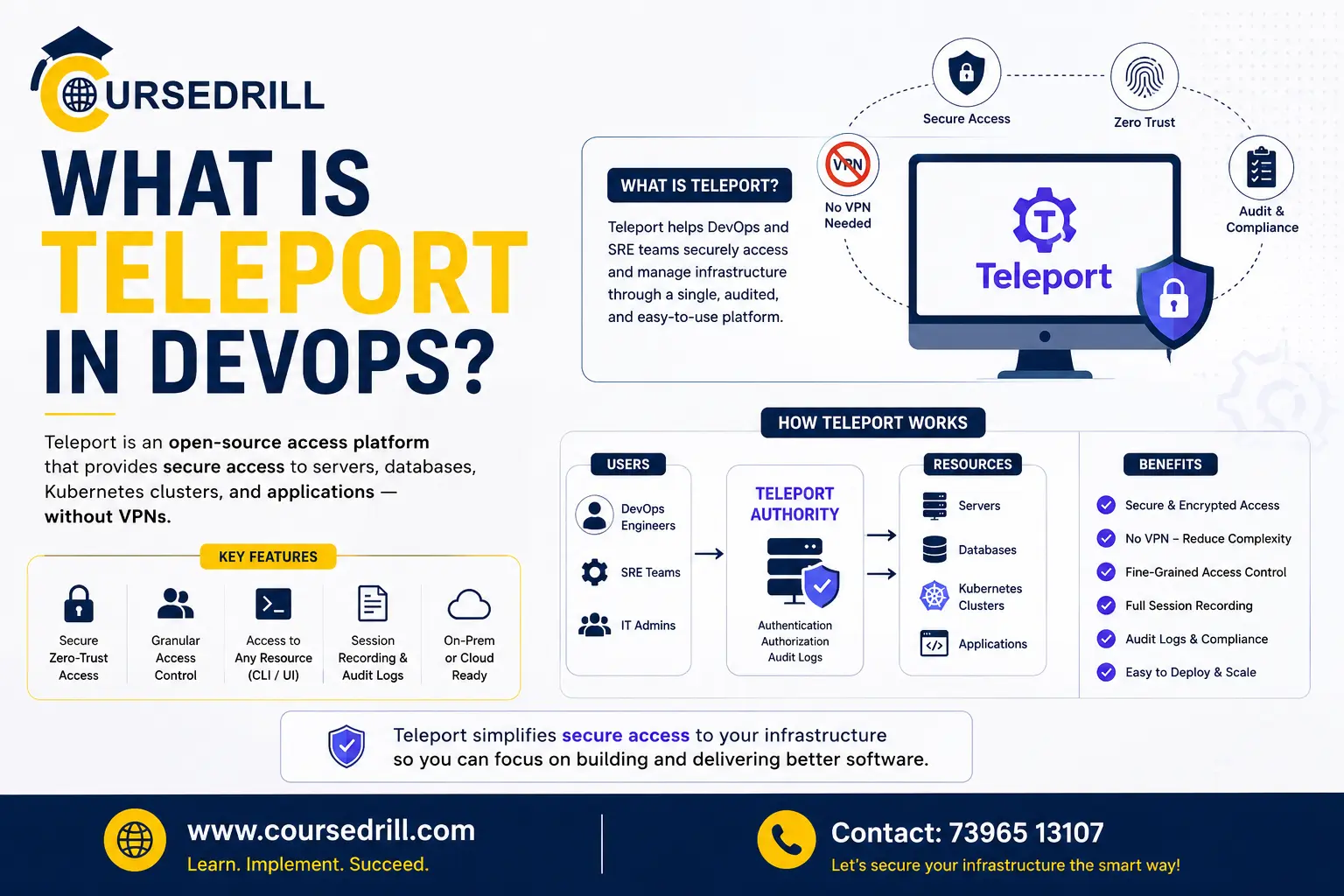
Teleport was built to replace that sprawl with one thing: identity. Instead of managing keys, passwords, and VPN configs scattered across every system you run, Teleport puts a single identity-aware layer in front of all of them and issues short-lived certificates instead of standing credentials.
This guide covers what Teleport actually is, how its certificate-based architecture works, what it can do out of the box, and where it fits in a modern DevOps stack.
What Is Teleport?
(cite index=”22-1″>Teleport is a certificate authority and identity-aware access proxy that implements protocols such as SSH, RDP, HTTPS, the Kubernetes API, and a variety of SQL and NoSQL database protocols. (cite index=”22-1″>It’s completely transparent to client-side tools and designed to work with everything already in a typical DevOps ecosystem, so your engineers keep using ssh, kubectl, and psql the way they always have, just without a static key or password behind any of it.
(cite index=”37-1″>The company behind it, originally called Gravitational, was part of the 2015 Y Combinator cohort, and Teleport was first released as an open-source tool in 2016. (cite index=”40-1″>Gravitational rebranded as Teleport in November 2020 and has focused since on the same mission: letting engineers quickly and securely access any resource, anywhere. (cite index=”37-1″>It’s since found its way into production at companies including Samsung, NASDAQ, IBM, Ticketmaster, and Epic Games, which says something about how well the certificate-based model holds up at real scale.
How Teleport Works
(cite index=”22-1″>Certificate-based authentication is widely considered the most secure form of authentication, but historically it’s also been the most complicated to manage. Teleport’s core job is automating certificate issuance so that complexity mostly disappears for the end user.
Here’s the actual flow. (cite index=”22-1″>Teleport operates its own internal certificate authorities. Each certificate proves identity, cluster membership, and manages access, and admins can configure a time-to-live for every certificate as well as rotate the CA itself to invalidate anything issued previously.
(cite index=”22-1″>Once a client authenticates with Teleport, they receive a client certificate that automatically works across every resource Teleport protects, and their ssh, kubectl, psql, mysql, and other remote-access commands get transparently configured with that identity.
The cluster is the organizing concept behind all of this. (cite index=”22-1″>A cluster is the foundation of Teleport’s entire security model, and clusters can even be configured to trust each other, letting users from one organization access designated resources inside another organization’s environment when that kind of cross-org access is actually needed.
Under the hood, a Teleport deployment is made up of a handful of cooperating services. (cite index=”38-1″>These include a central access proxy for secure connectivity, the certificate-issuing authentication service, role-based access control for permissions, audit logging of every event, and session recording with full playback, all of which (cite index=”26-1″>can run on a single node for smaller deployments or be split across a cluster for larger, higher-availability ones.
Identity itself doesn’t have to come from Teleport’s own user store. (cite index=”22-1″>Teleport ships with a built-in database for user management, but for production use it’s typically integrated with enterprise SSO through Okta, GitHub, Google Workspace, Active Directory, or another identity provider. Teleport isn’t trying to replace your identity provider, it’s trying to be the thing that turns an authenticated identity into scoped, time-limited access across every piece of infrastructure you run.
Core Features
Unified access across protocols. (cite index=”23-1″>A single platform covers SSH, Kubernetes, databases, applications, and desktops, which means one audit trail and one RBAC model instead of five disconnected ones. (cite index=”26-1″>Database access specifically supports IAM auth for RDS and Aurora, along with protocol-aware proxying for PostgreSQL, MySQL, MongoDB, Redis, and MSSQL, all without ever exposing a raw database port to the network. (cite index=”22-1″>Remote desktop access works straight through the Teleport Web UI’s built-in client, so there’s no need to install a separate RDP or VNC tool.
No standing credentials. (cite index=”28-1″>Instead of long-lived credentials scattered across every system, access becomes ephemeral and controlled entirely by identity and policy, with short-lived certificates replacing SSH keys, database passwords, and one-off SSO workarounds.
Role-based access control. (cite index=”28-1″>Fine-grained roles and policies enforce least-privilege access down to the level of which resources, commands, or database queries a given identity is allowed to touch.
Session recording and audit trails. (cite index=”28-1″>Every action gets captured in detailed session recordings and audit logs, and (cite index=”21-1″>those audit logs of remote connection sessions provide the level of insight needed for continuous compliance monitoring in regulated environments.
Just-in-time access requests. (cite index=”26-1″>Access Requests let users request elevated permissions for a limited window, with a Slack, PagerDuty, or ServiceNow plugin notifying whoever needs to approve it. (cite index=”28-1″>Managers or on-call leads can approve or deny with a clear audit trail attached to the decision, which turns “give me admin for an hour” into a logged, reversible event instead of a permanent role change someone forgets to undo.
Machine and workload identity. Teleport’s scope has expanded past human engineers. (cite index=”24-1″>The Teleport Machine and Workload Identity platform unifies authentication, authorization, and access control for non-human identities, eliminating reliance on static passwords, API keys, and application secrets that are easy to compromise.
(cite index=”24-1″>It supports multi-region high availability capable of scaling to roughly 140,000 connected resources across nine availability zones, which is squarely aimed at large, dynamic cloud environments where workloads spin up and down constantly.
Zero Trust, and What That Actually Means Here
“Zero trust” gets used loosely enough in marketing copy that it’s worth being precise about what Teleport actually does. (cite index=”23-1″>Every connection is independently authenticated and authorized regardless of network location, which eliminates network-based trust, the assumption that anything inside the VPN or the office network is automatically safe. That’s the real shift: access decisions get made per-connection based on identity and policy, not based on which subnet a request came from.
It’s also worth being honest about what zero trust here doesn’t cover. (cite index=”23-1″>Teleport eliminates network-based trust, but it doesn’t eliminate the need for application-level authorization, secrets management, or lateral movement controls elsewhere in your stack.
(cite index=”23-1″>Short-lived certificates remove standing credentials, but authorization still depends on centrally issued roles, and revoking access requires CA rotation or an explicit lockout rather than flipping a simple flag. Teleport closes a specific, significant gap. It isn’t a substitute for the rest of your security posture.
Licensing and Editions
Teleport’s licensing has changed more than once, and it’s worth knowing the current state before you commit to a deployment model.
(cite index=”35-1″>Teleport open sourced in 2015 and has grown to over 15,000 GitHub stars, with its core repository licensed under AGPLv3. (cite index=”31-1″>The project switched its OSS core from Apache 2.0 to AGPLv3 in December 2023, in an explicit effort to balance benefiting the community with sustaining a business behind the project.
Where it gets more nuanced is the Community Edition binaries. (cite index=”35-1″>Starting with Teleport 16, the compiled Community Edition binaries moved to a separate commercial license: individuals can still use it for personal and hobby projects with no restriction, but companies can only use the official binaries if they have fewer than 100 employees and less than $10 million in annual recurring revenue.
(cite index=”35-1″>If you compile the code yourself from source, the resulting binaries remain under AGPLv3 rather than that commercial restriction, which is a meaningful distinction if you’re evaluating it for a larger organization. (cite index=”33-1″>Teleport Enterprise itself is not open source at all, it’s licensed under a separate commercial license with its own feature set layered on top of the core.
Pricing
(cite index=”28-1″>Teleport offers a mix of open source, cloud, and enterprise pricing options. (cite index=”28-1″>For small startups with strong in-house DevOps capability, the open-source version can deliver a lot of value at no license cost, though you take on the full operational overhead of running it yourself. For fast-moving teams without dedicated infrastructure specialists,
Teleport Cloud is often the more practical choice despite the subscription cost, since the managed service takes CA rotation, upgrades, and high availability off your plate.
(cite index=”29-1″>Teleport Cloud is aimed specifically at startups juggling recurring problems: developers need fast, reliable access to production and staging, security and compliance teams need strong authentication and detailed audit logs, and distributed teams need to be onboarded and offboarded cleanly, all without a dedicated platform team managing the access layer by hand.
Teleport vs. the Traditional VPN and Bastion Setup
(cite index=”26-1″>Traditional bastion hosts require managing static SSH keys and provide no SSO, no session recording, and no fine-grained RBAC. That combination is exactly what tends to rot over time: keys outlive the contractors who had them, bastion access lists drift from reality, and nobody has a clean answer to “who accessed production last Tuesday.”
(cite index=”25-1″>One team that used Teleport Access Requests alongside Auth0 described their prior setup as manually managed SSH keys and a bastion machine that had become an organizational nightmare, which is about as blunt a summary as you’ll find of the problem Teleport is built to solve. The shift isn’t just security theater either.
(cite index=”29-1″>Founders and lean DevOps teams get real, practical wins from it: eliminating custom SSH bastion hosts and VPN servers, centralizing configuration and access policy in one place, and cutting the risk of configuration drift in security-critical components.
Where Teleport Fits Alongside Your Identity Provider
Teleport deliberately doesn’t try to be your identity provider. It sits downstream of one, turning an authenticated identity into scoped, certificate-based access to actual infrastructure. If you’re also evaluating how to handle authentication and SSO itself, that’s a separate decision, and it’s worth understanding the tradeoffs between platforms like Zitadel and Keycloak before wiring either one up as the SSO source Teleport authenticates against.
Who Should Use Teleport?
Teleport tends to make the most sense for teams that:
- Are still managing SSH keys, bastion hosts, or VPN configs by hand and have felt the operational pain of that setup at some point.
- Need a single audit trail across SSH, Kubernetes, databases, and internal web apps rather than five disconnected logging systems.
- Operate in a regulated industry where session recording and exportable audit logs are part of a compliance requirement, not a nice-to-have.
- Want just-in-time, approval-based elevated access instead of permanent standing privileges for admin tasks.
- Are starting to manage non-human identities, like CI pipelines and service accounts, and want those brought under the same policy model as human engineers.
Frequently Asked Questions
Is Teleport free to use? The open-source core is free and licensed under AGPLv3 if you compile it yourself. Official compiled Community Edition binaries are free for individuals and for companies under 100 employees and $10 million in annual recurring revenue; larger companies need either a compiled-from-source deployment or a commercial license. Teleport Enterprise and Teleport Cloud are paid, commercially licensed offerings.
What protocols does Teleport support? Teleport works as an identity-aware proxy for SSH, RDP, HTTPS, the Kubernetes API, and a range of SQL and NoSQL database protocols, including PostgreSQL, MySQL, MongoDB, Redis, and MSSQL.
Does Teleport replace my VPN? For infrastructure access, yes, that’s largely the point. Teleport authenticates and authorizes each connection independently of network location, which removes the need for a traditional VPN as the access boundary for SSH, Kubernetes, database, and internal web app access.
Does Teleport work with my existing identity provider? Yes. Teleport includes a built-in user store for smaller or lab deployments, but production setups typically integrate it with an existing SSO provider like Okta, GitHub, Google Workspace, or Active Directory.
What is Teleport Machine and Workload Identity? It’s Teleport’s extension of the same certificate-based access model to non-human identities, like CI/CD pipelines, service accounts, and workloads, replacing static API keys and secrets with short-lived certificates issued the same way as human user access.
How is Teleport different from a traditional bastion host? A bastion host typically means managing static SSH keys by hand, with no built-in SSO, no session recording, and no fine-grained role-based access control. Teleport replaces that with certificate-based authentication, identity provider integration, and a full audit trail with session playback for every connection.
Final Thoughts
Teleport solves a problem most DevOps teams don’t fully appreciate until they’re several years and a few painful audits into running infrastructure: static credentials accumulate, and nobody has a clean way to account for who can reach what. Replacing SSH keys, VPN configs, and database passwords with short-lived, identity-bound certificates closes that gap directly, at the cost of a real operational commitment to running (or paying for) the platform that issues them.
If your team is still managing access through a bastion host and a shared key file, it’s worth spending an afternoon with Teleport’s official documentation to see how much of that manual process the certificate model actually removes.
For more breakdowns of DevOps tooling, identity platforms, and infrastructure security, keep exploring the guides on CourseDrill.
Popular Courses

