
- Posted on
- admin
- No Comments
What is Backstage in DevOps?
What is Backstage in DevOps? Learn how this open-source developer portal works, its software catalog, plugins, and templates, and why teams adopt it.
If your engineering org has grown past a handful of services and nobody can quite answer “who owns this, where are its docs, and how do I even get access to it” without pinging three different Slack channels, you’ve run into the exact problem Backstage was built to solve. So what is Backstage in DevOps, and why has it become the default starting point for teams building an internal developer portal? This guide covers everything from the core concept to how it’s actually structured under the hood.
What is Backstage?
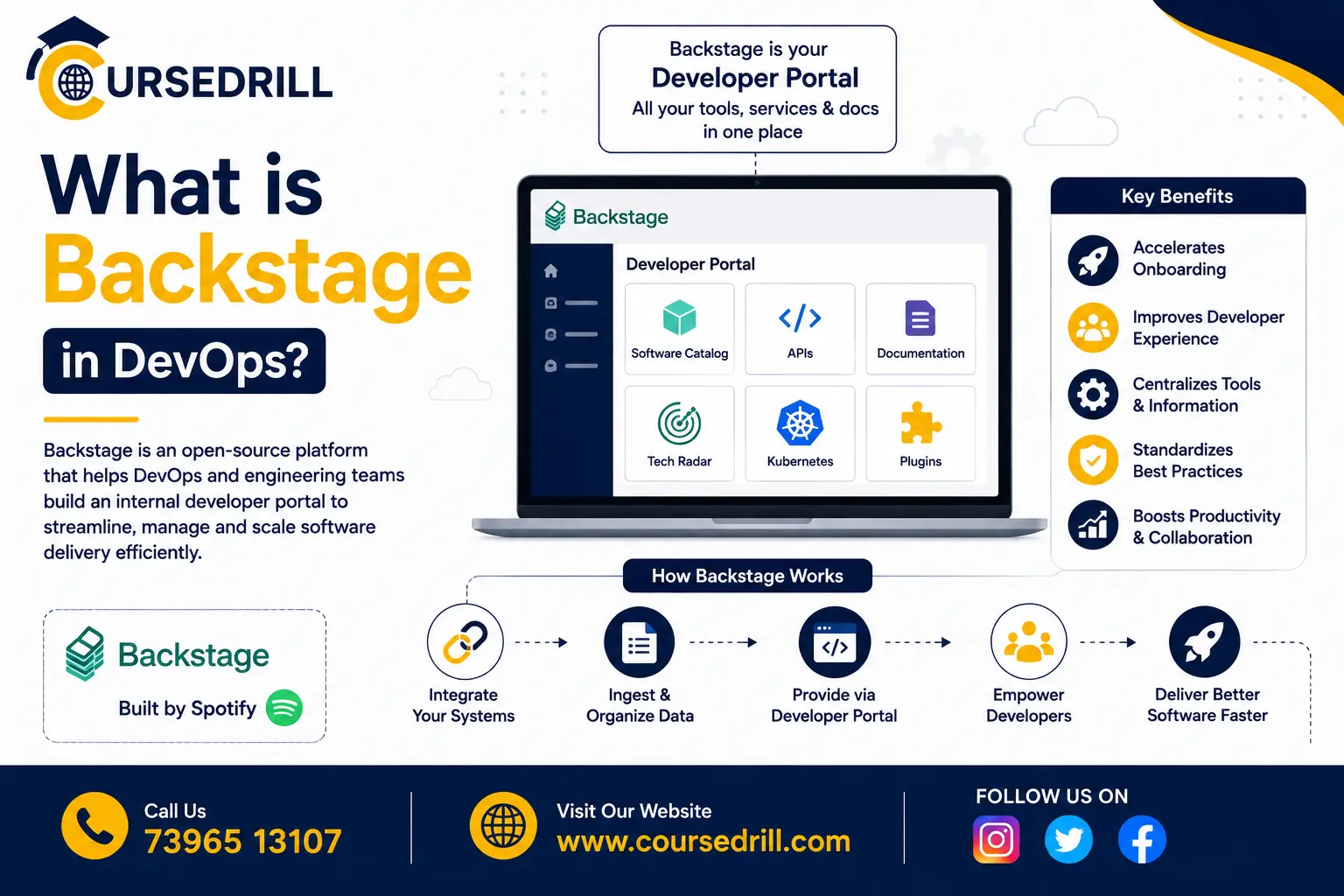
Backstage is an open-source platform for building developer portals, centralizing software catalogs, documentation, tooling, and infrastructure into a single, unified interface for engineering teams. Rather than developers hunting across a scattered mix of wikis, spreadsheets, dashboards, and tribal knowledge to answer basic questions about a service, ownership, dependencies, deployment status, documentation, Backstage aims to be the single front door to everything a developer needs to know or do.
Backstage was originally built internally at Spotify to solve exactly this problem at their own scale, hundreds of engineering teams and thousands of microservices, before being open-sourced in 2020 and donated to the Cloud Native Computing Foundation (CNCF). It has since graduated to CNCF’s top maturity tier and become the most widely adopted foundation for internal developer portals across the industry, with major companies including American Airlines, Netflix, and Epic Games building their own internal platforms on top of it.
It’s worth being precise about what Backstage actually is: a framework and a set of core building blocks (a software catalog, a plugin architecture, templating tools) rather than a single, finished product you install and immediately use as-is. Most organizations run their own customized instance of Backstage, built from its open-source core plus whatever plugins and internal customization their specific engineering org needs.
The Problem Backstage Solves
This is really the heart of what Backstage in DevOps is meant to address. To understand why Backstage exists, it’s worth looking at what growing engineering organizations run into without something like it.
As a company adopts microservices, the number of independently deployable services tends to grow far faster than any single engineer’s ability to keep a mental map of all of them. New engineers joining a team have no reliable way to discover what services exist, who owns them, or how to actually get started working with one. Documentation, when it exists at all, is scattered across READMEs, wikis, and Confluence pages with no consistent structure or discoverability. Provisioning a new service often means manually copying boilerplate from an existing one, or worse, starting from scratch and reinventing organizational conventions inconsistently across teams.
This isn’t just an inconvenience, it’s a genuine productivity tax that compounds as an organization scales. Platform and DevOps teams often end up as the informal, overloaded source of truth for questions a self-service tool could answer instead, “which team owns this API,” “what’s the right way to spin up a new service,” “where’s the runbook for this incident.”
Backstage’s answer is to centralize all of this into a single, structured, searchable interface: a software catalog that knows what exists and who owns it, standardized templates for creating new services consistently, and integrated documentation that lives alongside the code it describes rather than drifting apart from it in a separate wiki.
How Backstage Works: Core Architecture
Backstage is built around a handful of core building blocks, each addressing a specific piece of the developer portal problem.
The Software Catalog
The Software Catalog is Backstage’s central registry of everything in your engineering organization, services, APIs, libraries, infrastructure resources, and the teams that own them. Each item in the catalog is represented as an entity, described in a YAML file (conventionally named catalog-info.yaml) that typically lives alongside the code it describes, in the same Git repository.
This is a deliberate design choice: rather than maintaining catalog metadata in a separate system that inevitably drifts out of sync with reality, the catalog entry lives with the code itself, versioned and updated through the same pull request workflow developers already use for everything else.
Software Templates (the Scaffolder)
Software Templates let platform teams define standardized, self-service workflows for creating new components, a new microservice, a new library, a new pipeline. Instead of a developer copying an existing repository and manually adjusting boilerplate, they can use a template through Backstage’s UI, answer a few configuration questions, and get a fully scaffolded, correctly structured new service, registered in the catalog automatically, following whatever conventions the platform team has defined.
This is one of Backstage’s most immediately valuable features for larger organizations, since it turns “how do I start a new service the right way” from a question requiring platform team involvement into genuine developer self-service.
TechDocs
TechDocs is Backstage’s built-in documentation system, rendering Markdown documentation stored alongside code (in the same repository, following a docs-as-code approach) directly within the Backstage UI. Because documentation lives in the same repository as the code it describes and goes through the same review process, it’s far less likely to silently drift out of date compared to documentation maintained in a completely separate wiki system.
Search
Backstage includes a unified search feature spanning the catalog, documentation, and any other indexed content, giving developers a single place to look for anything, a specific service, a piece of documentation, an API definition, rather than needing to know in advance which specific tool or system would have the answer.
The Plugin Architecture
Nearly everything beyond the core catalog and scaffolder is implemented as a plugin, and this is arguably Backstage’s most important architectural decision. Plugins can add new pages, new catalog entity types, integrations with external tools (CI/CD systems, cloud providers, incident management tools, cost monitoring), or entirely new functionality to a Backstage instance.
Backstage maintains an open plugin marketplace with contributions from both the core team and the broader community, covering integrations with tools like Kubernetes, ArgoCD, PagerDuty, SonarQube, and many others. Organizations also commonly build their own internal plugins specific to their internal tooling, which is expected and well-supported by Backstage’s plugin API.
Key Concepts You’ll Run Into
A few additional terms come up constantly once you start working with Backstage.
Entities are the core objects tracked in the catalog. The main entity kinds are Component (a piece of software, a service or library), API (an interface a component exposes), Resource (physical or virtual infrastructure, a database, a queue), System (a collection of related components and resources), Domain (a higher-level grouping of related systems), User, and Group (representing people and teams, used for ownership).
Relations connect entities to each other, a Component dependsOn a Resource, a Component is ownedBy a Group, an API providesApi relationship linking a Component to the interfaces it exposes. These relations are what let the catalog answer questions like “what would break if this service went down” by tracing dependency relationships.
Ownership is a first-class concept throughout Backstage, every catalog entity is expected to declare an owning team, which is what allows the catalog to answer “who do I contact about this” reliably rather than leaving that as tribal knowledge.
Annotations are metadata key-value pairs attached to entities, often used by plugins to link a catalog entity to an external system, connecting a Component entity to its corresponding GitHub repository, its Kubernetes namespace, or its PagerDuty service, for instance.
A Simple Example: catalog-info.yaml
Here’s what a basic catalog entry looks like for a service, typically committed directly into that service’s repository:
apiVersion: backstage.io/v1alpha1
kind: Component
metadata:
  name: order-service
  description: Handles order creation and payment processing
  annotations:
    github.com/project-slug: my-org/order-service
    pagerduty.com/service-id: PXXXXX
spec:
  type: service
  lifecycle: production
  owner: team-checkout
  system: ecommerce-platform
  providesApis:
    - order-api
Once this file is merged into the repository, Backstage’s catalog automatically picks it up (through a configured integration with the source control provider) and registers order-service as a Component entity, owned by team-checkout, part of the ecommerce-platform system, with links to its GitHub repository and PagerDuty service already wired up through the annotations. Anyone browsing the catalog can now find this service, see who owns it, jump directly to its documentation, and understand what larger system it’s part of, without asking anyone directly.
Backstage vs Alternatives
Backstage isn’t the only option in the internal developer portal space, and it’s worth understanding how it compares to the alternatives.
Backstage vs building your own internal wiki. A Confluence or Notion-based internal wiki is easy to start but has no structured, enforceable data model, no automatic sync with actual running infrastructure, and tends to rot as it drifts out of date. Backstage’s catalog model, tied to code and infrastructure directly, is specifically designed to avoid this decay.
Backstage vs Port, Cortex, or Atlassian Compass. These are commercial, hosted internal developer portal products that solve a similar problem to Backstage but as a managed SaaS offering rather than an open-source framework you self-host and customize. They typically offer faster initial setup and less operational overhead, at the cost of less deep customization and an ongoing subscription cost. Teams with strong platform engineering capacity and a need for deep customization often prefer Backstage; teams wanting to move faster with less initial engineering investment often prefer a managed alternative.
Backstage vs no developer portal at all. For very small engineering teams, a handful of services and a small enough team that everyone already knows what exists, a dedicated developer portal is often unnecessary overhead. Backstage’s value proposition scales with organizational complexity, it solves a problem that mostly doesn’t exist yet at small scale, and becomes increasingly valuable as the number of services and teams grows.
Common Use Cases for Backstage
Backstage shows up across a range of platform engineering and DevOps needs:
- Service catalogs, giving every engineer a reliable, searchable source of truth for what services exist and who owns them
- Self-service scaffolding, letting developers create new, correctly configured services without platform team involvement for every request
- Centralized documentation, keeping technical docs versioned alongside code and easily discoverable in one place
- API discovery, helping teams find and understand existing internal APIs before building redundant new ones
- Onboarding, giving new engineers a single starting point to explore the systems, teams, and tools relevant to their work
- Cost and ownership visibility, through plugins that surface infrastructure cost or resource ownership data directly in the catalog
Deployment and Getting Started
Backstage is entirely self-hosted, there’s no official managed SaaS offering from the open-source project itself, though several vendors (including Roadie, founded by some of Backstage’s original creators) offer managed hosting built on top of the open-source core for teams that don’t want to run the infrastructure themselves.
Getting started locally is straightforward using Backstage’s official CLI:
npx @backstage/create-app@latestThis scaffolds a new Backstage application with sensible defaults, which you can then run locally, customize, and gradually extend with additional plugins and catalog integrations as your needs grow. Most organizations start with this default app and incrementally add the specific plugins, catalog integrations, and internal customizations relevant to their own tooling, rather than trying to configure everything at once.
Benefits of Using Backstage
Pulling together what makes Backstage worth adopting:
A single source of truth for what exists. The software catalog gives every engineer a reliable, structured answer to “what services exist and who owns them,” replacing scattered, informal tribal knowledge.
Documentation that stays current. Docs-as-code through TechDocs keeps documentation versioned and reviewed alongside the code it describes, reducing the drift that plagues separately maintained wikis.
Standardized, self-service scaffolding. Software Templates turn “start a new service correctly” into a self-service action rather than a platform team bottleneck.
Deep extensibility. The plugin architecture means Backstage can integrate with essentially any internal or external tool an organization already uses, rather than forcing a rigid, predetermined feature set.
Strong ecosystem and backing. As a graduated CNCF project with adoption from major engineering organizations, Backstage has significant community momentum, a large plugin marketplace, and long-term project stability.
Challenges and Things to Consider
Backstage isn’t a quick win, and it’s worth being honest about the tradeoffs.
Initial setup and ongoing maintenance require real, dedicated engineering investment. Backstage is a framework, not a finished product, and most organizations need a platform team actively building, customizing, and maintaining their instance rather than a one-time installation.
Catalog data is only as good as what teams actually commit to their catalog-info.yaml files. Backstage doesn’t automatically discover and populate accurate ownership and metadata without teams actively maintaining those files, which requires organizational buy-in and process, not just tooling.
The plugin ecosystem, while extensive, varies in quality and maintenance across community-contributed plugins. Some integrations are well-maintained and production-ready; others may require internal engineering effort to adapt or maintain.
For smaller organizations, the operational overhead of running and maintaining a Backstage instance may outweigh the problem it solves, at least until the organization reaches a scale where service and team sprawl actually becomes a genuine daily friction point.
Frequently Asked Questions About Backstage
Is Backstage free to use? Yes, Backstage’s core platform is fully open source under the Apache 2.0 license. Cost typically comes from the engineering time required to run, customize, and maintain your own instance, or from a managed hosting vendor if you choose not to self-host.
Do I need Kubernetes to run Backstage? No. Backstage itself is a Node.js application that can run on various infrastructure, including a single server or container, without requiring Kubernetes. Many organizations do deploy it on Kubernetes as part of their broader infrastructure, but it isn’t a strict requirement.
How is Backstage different from a CI/CD tool? Backstage isn’t a CI/CD system itself, it’s a portal that can integrate with and surface information from your existing CI/CD tools (through plugins) alongside catalog, documentation, and ownership data, giving developers a unified view rather than replacing your pipeline tooling.
Who should own maintaining a Backstage instance? Typically a platform engineering or DevOps team, since running Backstage well requires ongoing investment in plugin development, catalog governance, and keeping the instance aligned with the organization’s actual tooling and conventions as both evolve.
Can small teams benefit from Backstage? Generally, the value proposition scales with organizational complexity. Very small teams with a handful of services often don’t yet feel the pain Backstage solves, and the setup and maintenance overhead may not be worth it until the team and service count grows meaningfully.
Does Backstage replace the need for good documentation practices? No. TechDocs gives you a good place to render and discover documentation, but it doesn’t write documentation for you. Teams still need to actually write and maintain good docs; Backstage just removes the friction of finding and keeping them versioned alongside code.
Wrapping Up
To answer the original question, what is Backstage in DevOps, in a single sentence: it’s an open-source framework for building an internal developer portal, centralizing your software catalog, documentation, and self-service tooling into a single interface, so engineers spend less time hunting for basic information and platform teams spend less time being the informal source of truth for questions a good catalog should answer on its own.
Backstage isn’t a quick plug-and-play tool, it’s a genuine platform engineering investment, but for organizations dealing with real service and team sprawl, it’s become the industry’s default starting point for solving that problem, backed by a mature, graduated CNCF project and a large, active plugin ecosystem.
For deeper technical reference as you evaluate or start building, the official Backstage documentation covers the full catalog model, plugin development, and deployment guides in much more depth than a single overview article can.
Popular Courses

