
- Posted on
- admin
- No Comments
Keycloak vs Okta: Key Differences
Keycloak vs Okta compared: deployment model, pricing, protocol support, and which identity and access management tool fits your team.
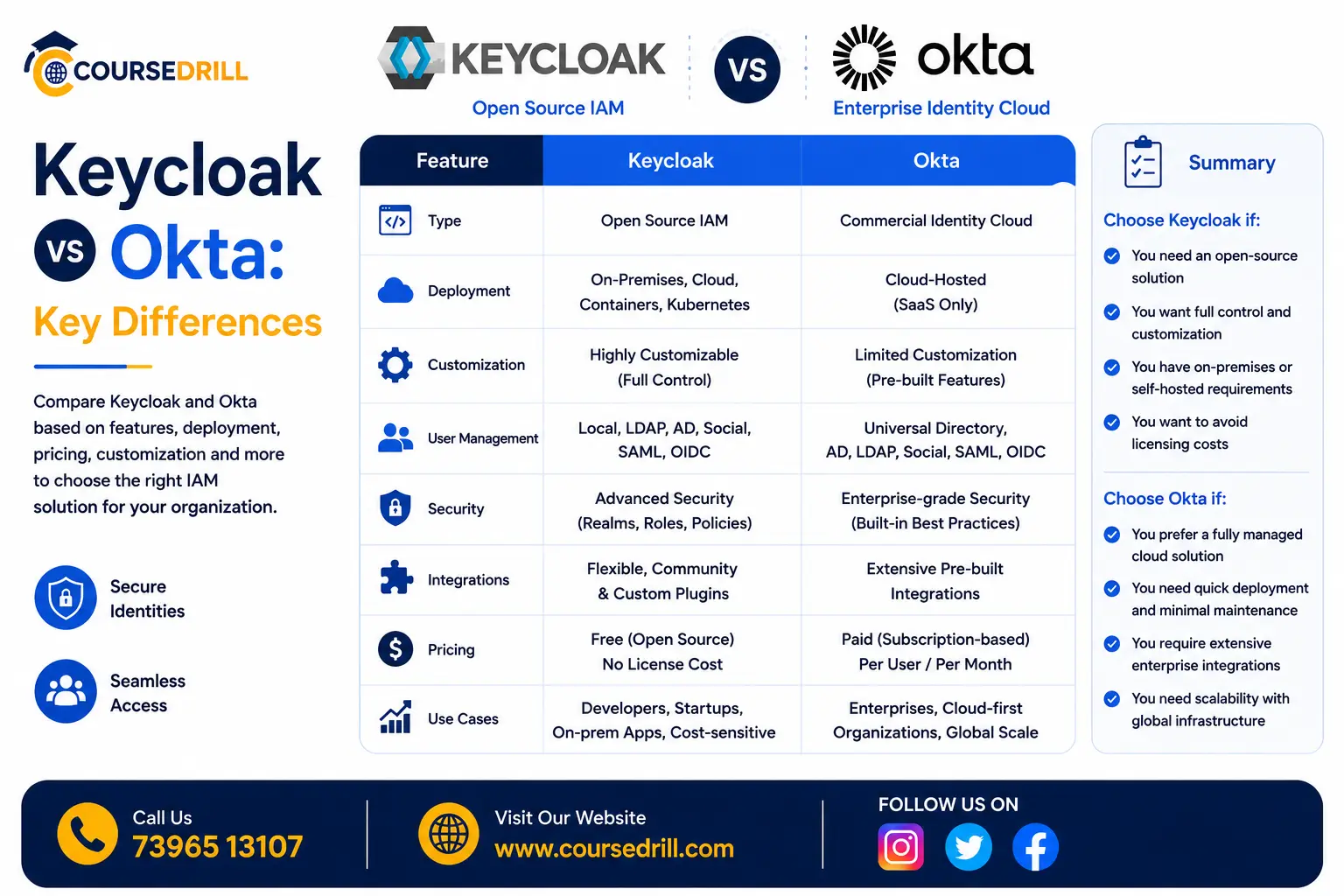
Choosing an identity and access management platform usually comes down to a fairly fundamental question: do you want to run it yourself, or pay someone else to run it for you? That’s the core tension between Keycloak and Okta, two of the most commonly evaluated IAM options, one open-source and self-hosted, the other a commercial, fully managed service. This comparison breaks down exactly where they diverge, so you can figure out which fits your team’s actual constraints.
Quick Overview
Understanding Keycloak vs Okta starts with a basic split in philosophy: open-source and self-hosted versus commercial and fully managed. Keycloak is an open-source identity and access management platform, self-hosted, free to run, and now developed under the CNCF as an incubating project. If you haven’t read our full breakdown yet, our What is Keycloak guide covers its architecture and core concepts in more depth than this comparison will.
Okta is a commercial, cloud-hosted identity-as-a-service platform, one of the most established players in enterprise identity management, offering a fully managed service with extensive integrations, dedicated support, and enterprise-grade compliance certifications built in.
Both implement the same core industry-standard protocols, OAuth 2.0, OpenID Connect, and SAML, so from a purely technical integration standpoint, most applications can work with either. The real differences show up in deployment model, cost structure, and operational responsibility.
Deployment Model: Self-Hosted vs SaaS
This is the foundational difference everything else follows from.
Keycloak runs on your own infrastructure, whether that’s Docker, Kubernetes, or traditional servers. You’re responsible for provisioning it, keeping it patched and updated, configuring high availability, and managing the backing database. In exchange, you get full control over where your identity data lives, which matters for organizations with strict data residency or compliance requirements that specifically require keeping user data within their own infrastructure.
Okta is entirely cloud-hosted and managed by Okta itself. There’s no server to provision, patch, or scale, you configure your organization’s identity setup through Okta’s admin console and APIs, and Okta handles all underlying infrastructure, uptime, and scaling. This removes real operational burden but also means your identity data lives on Okta’s infrastructure rather than your own.
Pricing Model
Keycloak’s core software is free and open source, with no licensing cost regardless of how many users or applications you connect to it. Your actual cost is the infrastructure you run it on and the engineering time required to operate it well, which can be substantial for a production-grade, highly available deployment, but doesn’t scale directly with user count the way a subscription does.
Okta’s pricing is subscription-based, typically priced per user or per active user per month, with different tiers unlocking additional features (advanced security policies, more sophisticated lifecycle management, additional integrations). This cost scales directly and predictably with your user base, which is straightforward to budget for at small scale but can become a significant, ongoing expense as an organization grows into tens of thousands of users.
For a rough mental model: Keycloak trades a predictable software cost of zero for a variable, engineering-time cost of self-hosting. Okta trades operational simplicity for a cost that grows linearly with your organization’s size.
Setup and Time-to-Value
Okta is built to get an organization to a working identity setup quickly. Since there’s no infrastructure to provision, a team can typically configure users, applications, and basic policies and have a working SSO setup within hours, not days, particularly for common, well-documented integrations.
Keycloak’s setup, especially for a genuinely production-ready deployment (proper database configuration, high availability, backup strategy, security hardening), takes meaningfully longer and requires real infrastructure expertise on your team. A basic local or development instance is quick to spin up, as covered in our What is Keycloak guide, but the gap between “working demo” and “production-grade deployment” is considerably wider for Keycloak than for a managed service like Okta.
Protocol and Feature Support
Both platforms support the core modern identity protocols thoroughly: OAuth 2.0, OpenID Connect, and SAML. For the vast majority of standard integration needs, either platform can technically support what you’re trying to do.
Where they diverge is in the breadth of pre-built integrations and advanced feature sets. Okta maintains an extensive catalog of pre-built integrations with popular SaaS applications, letting administrators connect to tools like Salesforce, Slack, or Workday through a largely point-and-click setup rather than manual protocol configuration. Keycloak supports the same underlying protocols these integrations rely on, but connecting to a specific third-party SaaS application generally requires more manual configuration work, following that application’s own documentation for setting up a generic OIDC or SAML connection, rather than a pre-built, one-click integration.
Customization and Extensibility
Keycloak’s open-source nature gives it a real advantage here. Since you control the running instance directly, you can customize authentication flows, build custom user federation providers, modify the login theme extensively, and extend functionality through Keycloak’s Service Provider Interface (SPI) in ways that go well beyond configuration options exposed through an admin UI.
Okta, as a managed SaaS platform, offers configuration and policy customization through its admin console and APIs, along with its own extensibility mechanisms (like Okta Workflows for automation), but you’re fundamentally working within the boundaries of what Okta exposes as a platform, rather than having access to modify the underlying system directly.
For organizations with genuinely unusual authentication requirements or deep customization needs, Keycloak’s openness matters more. For organizations whose needs fit within standard identity management patterns, Okta’s configuration surface is typically more than sufficient without needing that deeper level of control.
Scalability and Enterprise Features
Okta has a long track record supporting very large enterprise deployments, with mature tooling around lifecycle management (automatically provisioning and deprovisioning users as they join or leave), adaptive multi-factor authentication, and detailed compliance reporting, features built specifically for large organizations with complex governance requirements.
Keycloak can scale to handle large deployments too, and is used in production by sizable organizations, but achieving that scale requires your own team to correctly architect for it, clustering, database performance tuning, and careful capacity planning, rather than inheriting that scalability as a built-in property of a managed service.
Security and Compliance
Okta, as an established commercial vendor, holds various compliance certifications out of the box (SOC 2, ISO 27001, and others depending on plan tier), which can meaningfully simplify compliance audits for organizations that need to demonstrate their identity provider meets specific certification standards, since Okta’s own certifications can be referenced directly as part of that process.
Keycloak’s security depends heavily on how well your team configures and maintains it. The software itself is mature and widely audited as an open-source project, but achieving a specific compliance certification for your own deployment is your organization’s responsibility to establish and demonstrate, not something inherited automatically from the software itself.
Support and Maintenance
Okta includes vendor support as part of its subscription, with defined SLAs depending on your plan tier, giving you a direct escalation path when something goes wrong.
Keycloak’s support comes from its open-source community by default, active but without formal SLAs. Organizations wanting commercial support for Keycloak specifically can look at Red Hat’s build of Keycloak (Red Hat Build of Keycloak, part of Red Hat’s enterprise offerings), which provides commercial support and additional enterprise assurances on top of the open-source core, for teams wanting Keycloak’s flexibility with a formal support contract attached.
When to Choose Keycloak
Keycloak tends to be the stronger choice when:
- You need full control over where identity data physically lives, for data residency or compliance reasons that specifically require self-hosting
- Your organization has the infrastructure expertise to operate identity management as production-critical infrastructure
- You need deep customization of authentication flows or user federation beyond what a SaaS platform’s configuration options expose
- Avoiding per-user subscription costs matters, particularly at very large user scale where that cost would otherwise grow substantially
- You’re already invested in a broader open-source, self-hosted, cloud-native stack and want identity management to fit that same operational model
When to Choose Okta
Okta tends to be the stronger choice when:
- You want to minimize operational overhead and get a working identity setup quickly, without dedicating engineering time to running infrastructure
- Your organization needs the extensive pre-built integration catalog Okta offers for common enterprise SaaS applications
- Built-in compliance certifications and vendor support meaningfully simplify your organization’s own audit and governance requirements
- Your team doesn’t have (or doesn’t want to dedicate) the infrastructure expertise needed to run identity management as reliable, production-grade self-hosted infrastructure
- Predictable, if recurring, subscription cost is preferable to the variable engineering-time cost of self-hosting
Multi-Tenancy and Organizational Structure
How each platform handles separating different groups of users, applications, or business units is worth a closer look, since it shapes how you’d actually structure a real deployment.
Keycloak uses realms as its isolation boundary, entirely separate spaces of users, roles, and clients within a single running instance. An organization might run one realm for employees, another for customers, and separate realms per environment (staging, production). Realms are completely isolated from each other by design, a user in one realm has no visibility or relationship to a user in another, unless you explicitly configure identity brokering between them. This gives you a lot of architectural flexibility, but it also means realm structure is a design decision your team needs to get right upfront, since restructuring realms later (splitting or merging them) is a nontrivial migration in its own right.
Okta uses a somewhat different model built around a single organization (org) as the primary tenant, with Okta Groups and, for larger customers, features like Okta’s org-to-org federation or dedicated tenant separation for genuinely distinct business units. Because Okta manages the underlying infrastructure, this multi-tenancy model is more opinionated and less flexible to restructure arbitrarily, but it also means you’re not responsible for reasoning about the operational implications of that structure the way you are with Keycloak’s realm model.
For organizations with a relatively simple structure, employees and maybe one customer-facing app, this difference may not matter much in practice. For larger organizations with many business units, brands, or genuinely separate customer populations, Keycloak’s realm flexibility can be a meaningful advantage, provided your team is comfortable designing and maintaining that structure correctly over time.
Developer Experience and Integration Effort
Beyond administrative configuration, it’s worth comparing what integrating each platform actually looks like from an application developer’s perspective.
Keycloak provides official adapters and libraries for various languages and frameworks, along with full support for standard OIDC and SAML libraries that already exist in virtually every modern language ecosystem, since Keycloak doesn’t require anything non-standard on the application side. Documentation is thorough but occasionally assumes a baseline familiarity with identity protocol concepts, meaning teams newer to OAuth2 and OIDC sometimes have a steeper initial learning curve working directly with Keycloak’s configuration options and terminology.
Okta invests heavily in developer experience specifically, offering polished SDKs for popular languages and frameworks, extensive quickstart guides, and an interactive developer console that walks through common integration patterns step by step. For a developer integrating identity into an application for the first time, Okta’s onboarding experience is generally considered smoother and faster, reflecting Okta’s positioning as a product where reducing developer friction is a direct part of their commercial value proposition.
Neither platform requires deep protocol expertise to get a basic integration working, but Okta’s investment in polish and guided onboarding tends to shorten that initial learning curve more than Keycloak’s more infrastructure-oriented documentation does.
A Closer Look at Total Cost of Ownership
Pricing comparisons often stop at “Keycloak is free, Okta charges per user,” but a more complete total cost of ownership picture is worth walking through, since the real comparison is more nuanced than that headline suggests.
For Keycloak, your costs include: compute and database infrastructure to run a production-grade, highly available deployment; engineering time for initial setup and configuration; ongoing engineering time for patching, upgrades, and monitoring; and the opportunity cost of your platform team’s time being spent on identity infrastructure rather than other priorities. For a mid-sized organization, this might realistically mean a fraction of one or two engineers’ ongoing time, plus modest infrastructure costs, numbers that don’t scale directly with user count the way a subscription does, but also don’t disappear just because Keycloak’s software license is free.
For Okta, costs are more predictable and directly tied to your subscription tier and active user count, but they also scale as your organization grows, and can include additional costs for premium features (advanced lifecycle management, more sophisticated adaptive authentication policies) that may become necessary as your identity requirements mature. There’s also effectively zero infrastructure or platform engineering time required specifically for running the identity service itself, though your team still needs time for configuration, integration work, and ongoing administration regardless of which platform you choose.
The crossover point, where Keycloak’s engineering-time cost roughly equals what an equivalent Okta subscription would cost, varies enormously by organization, depending on existing infrastructure expertise, how much of that expertise would need to be built from scratch specifically for this project, and how large and fast-growing your user base is. Organizations already running substantial self-hosted, cloud-native infrastructure with strong platform engineering capacity tend to find Keycloak’s marginal cost lower, since they’re already paying for much of the underlying operational capability regardless. Organizations without that existing infrastructure investment often find the true cost of standing up Keycloak well, including the learning curve and ongoing maintenance burden, higher than it initially appears from the “it’s free” framing alone.
High Availability and Disaster Recovery
For any identity provider, downtime is a particularly high-stakes failure mode, since it doesn’t just affect one application, it can lock users out of everything connected to it simultaneously. How each platform handles this is worth comparing directly.
Okta, as a managed service, handles high availability and disaster recovery as part of its core infrastructure responsibility, with published uptime SLAs depending on your plan tier, and a dedicated operations team managing failover, redundancy, and incident response on your behalf. From a customer’s perspective, achieving high availability for your identity layer is largely inherited automatically by using the service, rather than something your own team needs to architect.
Keycloak requires you to design and implement high availability yourself: a clustered deployment across multiple nodes, a resilient, properly replicated database backend, load balancing, and a tested disaster recovery plan. This is entirely achievable, Keycloak supports clustering and is run at scale in production by many organizations, but it’s genuine infrastructure work your team is responsible for getting right, including the ongoing burden of testing failover scenarios and keeping that infrastructure current as Keycloak itself is upgraded over time.
This difference is arguably where the “convenience versus control” tradeoff shows up most concretely. Okta’s SLA is a commercial guarantee backed by a dedicated vendor team; Keycloak’s reliability is exactly as good as your own team’s infrastructure design and operational discipline, no better, no worse.
Integration Ecosystem in Practice
Beyond the general point that Okta has more pre-built integrations, it’s worth being concrete about what that actually looks like day to day.
Connecting Okta to a common enterprise SaaS tool, Salesforce, Workday, Slack, typically means selecting that application from Okta’s integration catalog, providing a small number of configuration values, and having a working SSO connection within minutes, with Okta handling the specific protocol quirks of that particular application behind the scenes.
Connecting Keycloak to the same application means following that application’s own SAML or OIDC setup documentation directly, manually configuring the client in Keycloak’s admin console to match what the target application expects, attribute mappings, certificate exchange for SAML, redirect URI configuration, and testing the integration yourself. It’s entirely achievable and uses the exact same underlying protocols, but it’s manual, one-off configuration work rather than a guided, pre-built connector.
For organizations integrating with a handful of applications, this difference is a manageable, one-time setup cost either way. For organizations needing to connect dozens of different enterprise SaaS tools, the cumulative time savings from Okta’s pre-built integration catalog becomes considerably more significant, which is part of why Okta has found particularly strong adoption among larger enterprises with sprawling SaaS tool footprints.
Can You Migrate Between Them?
Migration is possible in both directions but requires real planning, since it involves moving user credentials, re-establishing trust relationships with every connected application, and carefully managing the cutover to avoid locking users out during the transition. Because both platforms support standard protocols, applications themselves often need minimal changes, updating configuration to point at a new identity provider’s endpoints, rather than a full re-integration. The harder part is typically the user migration itself (password hashes often can’t be directly transferred between systems, requiring a password reset flow for affected users) and coordinating the cutover without disrupting active sessions.
Frequently Asked Questions
These are the questions that come up most often once teams start actually weighing Keycloak vs Okta for a real decision.
Is Keycloak really free, with no hidden costs? The software itself is completely free with no licensing fees. Your actual cost is the infrastructure and engineering time to run it well, which is real but doesn’t scale per-user the way a subscription does.
Which one is more secure? Both, when configured correctly, meet modern security standards for identity management. Okta’s security posture benefits from a dedicated vendor team and built-in compliance certifications; Keycloak’s security depends on your own team’s configuration and operational diligence. Neither is inherently more secure in the abstract, the practical security outcome depends heavily on execution.
Can I use Keycloak and Okta together? It’s uncommon but not impossible, some organizations use Okta as their primary identity provider while running Keycloak for specific internal tools or legacy systems with particular requirements. Generally, though, most organizations standardize on a single identity provider to avoid the added complexity of managing two systems in parallel.
Does Okta support self-hosting for organizations that want more control? No, Okta is exclusively a managed cloud service. Organizations wanting self-hosted control specifically should look at Keycloak or a similar open-source alternative rather than Okta.
Is Keycloak suitable for a small startup? It can be, particularly for cost-conscious teams with some infrastructure expertise already on staff. That said, many small teams find the operational overhead isn’t worth it at their current scale and prefer Okta’s (or a similar managed service’s) faster time-to-value, switching to a self-hosted option later if cost or customization needs grow significantly.
Which is better for a large enterprise? Both are used successfully at enterprise scale. Okta’s built-in lifecycle management, compliance tooling, and vendor support are often a strong fit for large organizations with complex governance needs and less appetite for running identity infrastructure themselves. Large organizations with strong internal platform teams and data residency requirements often choose Keycloak (sometimes via Red Hat’s commercially supported build) specifically for the control it provides.
Final Verdict
At the end of the day, Keycloak vs Okta ultimately comes down to a tradeoff between control and convenience. Keycloak gives you full ownership of your identity infrastructure and data, extensive customization, and no per-user licensing cost, at the price of taking on real operational responsibility. Okta removes that operational burden entirely, backed by a mature managed service, extensive pre-built integrations, and vendor support, at the price of an ongoing subscription cost that scales with your organization’s size.
Neither is a universally correct choice. Teams with strong infrastructure capacity, data residency requirements, or a need for deep customization tend to lean toward Keycloak. Teams prioritizing speed, minimal operational overhead, and built-in enterprise features tend to lean toward Okta. Understanding which set of priorities actually matters most for your organization is the real decision here, more than any single technical feature comparison.
For the deeper technical foundation behind Keycloak specifically, see our What is Keycloak guide, and for Okta’s own product details and documentation, see Okta’s official documentation for their side of the technical picture covered here.
Popular Courses

