
- Posted on
- admin
- No Comments
CPU vs GPU vs TPU: Choosing the right compute for your AI workload
Choosing a compute option for an AI project can be rather confusing. CPUs, GPUs, and TPUs can all run AI workloads, but they handle them differently. So, how do you know what’s what?
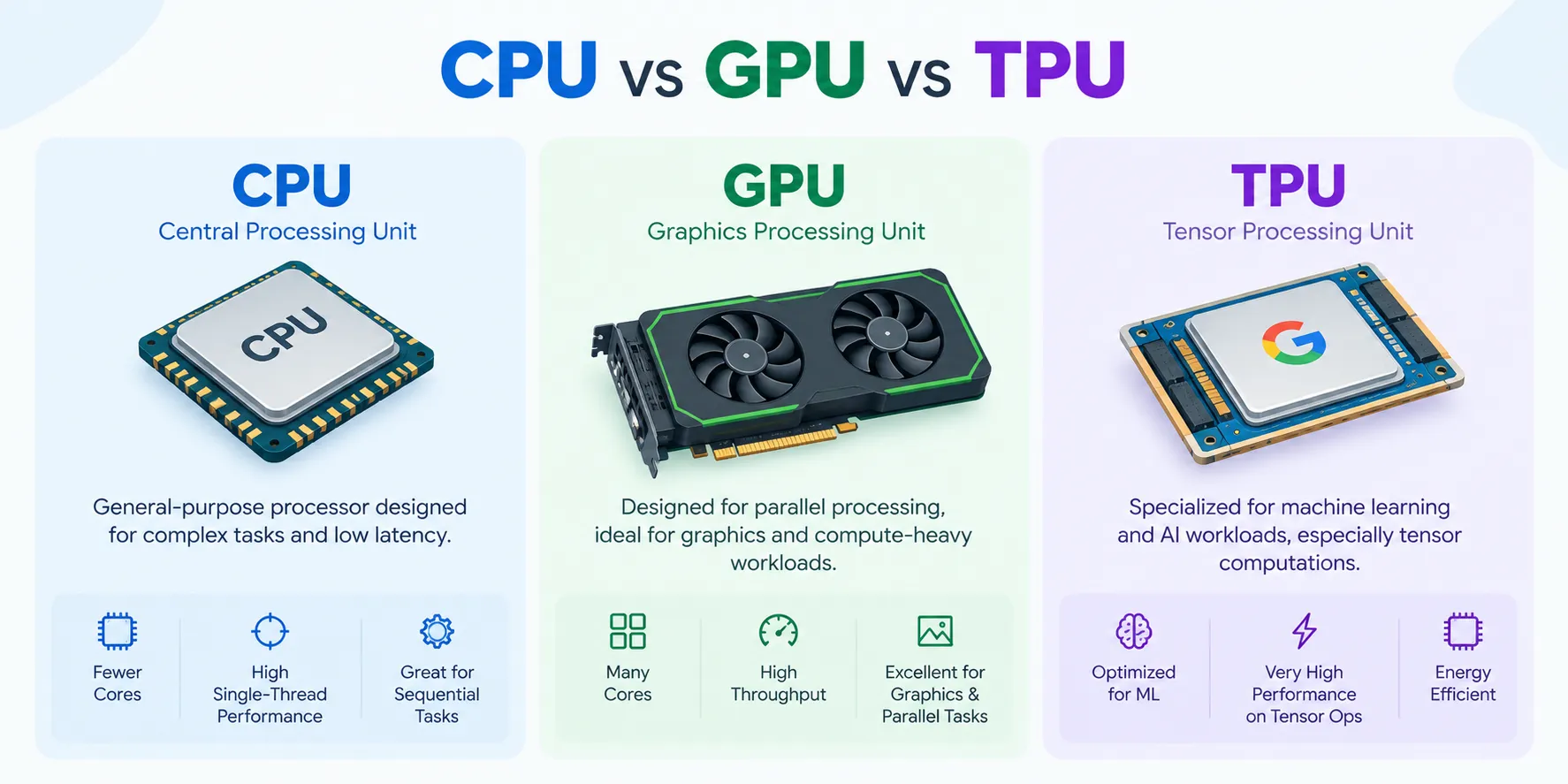
A CPU works well for general computing and application logic. A GPU can process many AI calculations in parallel. A TPU is designed specifically for machine learning operations that operate on tensors.
The right option depends on the model, workload size, software stack, and how the application will run in production.
Here is how each one fits into an AI workflow.
What is the difference between a CPU, GPU, and TPU?
The key difference comes down to how each processor handles work.
A CPU is designed for flexibility. It handles operating systems, application logic, databases, web servers, and a wide range of everyday computing tasks.
A GPU contains many smaller processing units that can perform large numbers of calculations simultaneously. This makes it useful for AI training, inference, image processing, and other parallel workloads.
A TPU, or Tensor Processing Unit, is an accelerator designed for machine learning calculations. Google developed TPUs around tensor operations commonly used in neural networks.
Here is a simple comparison:
| Factor | CPU | GPU | TPU |
| Main use | General computing | Parallel computing and AI | Machine learning acceleration |
| Strength | Flexibility | High parallel processing | Tensor-based AI workloads |
| Typical AI role | Data preparation and lighter inference | Training, inference, vision, media | Large ML training and inference |
| Software support | Very broad | Broad AI ecosystem | Strongest within supported ML stacks |
| Deployment | Local, server, cloud | Local, server, cloud | Primarily cloud and specialized systems |
When should you use a CPU for AI?
CPUs remain useful throughout an AI workflow.
They can prepare datasets, run application logic, handle API requests, manage databases, and coordinate work sent to accelerators.
Smaller AI models can also run directly on CPUs.
CPU compute can suit:
- Small machine learning models
- Data preprocessing
- Business logic around an AI application
- Development and testing
- Low-volume inference
- Workloads with limited parallel processing
A CPU can be a practical starting point when the model is small and response time requirements are moderate.
When does a GPU make sense for AI?
GPUs are useful when a workload contains many calculations that can run in parallel.
Modern neural networks involve extensive matrix and tensor operations. GPUs can perform these operations across many processing cores in parallel.
This makes GPUs useful for:
- Large language model inference
- Model training
- Fine-tuning
- Image generation
- Computer vision
- Speech processing
- Video analytics
- Recommendation systems
GPU memory is also important. Larger models require sufficient memory to store model weights, input data, and intermediate information used during processing.
A team evaluating GPU cloud providers can compare available GPU models based on memory, workload type, expected usage, and pricing.
When should you use a TPU for machine learning?
TPUs are designed around tensor operations, which are used heavily in machine learning.
They are closely associated with frameworks and workloads built around the Google machine learning ecosystem. TPUs can support large training jobs and inference workloads where the model and software stack fit the available hardware.
They can suit:
- Large neural network training
- TensorFlow workloads
- Large-scale inference
- Research workloads
- Distributed machine learning
The software environment matters here. Teams already using frameworks and tools with strong TPU support can integrate them more easily into the workflow.
Which compute works best for AI training?
Training often benefits from highly parallel hardware.
GPUs are widely used because they support many machine learning frameworks and can scale across several devices.
TPUs can also support large training workloads, particularly when the model and software stack are well-suited to TPU tooling.
CPU resources still play an important supporting role during training. They can prepare data, run preprocessing tasks, and manage the wider system.
For larger projects, the final setup may combine several types of compute.
Which compute works best for AI inference?
Inference requirements depend heavily on the application.
A small internal model with limited traffic may run efficiently on a CPU.
A production chatbot, recommendation system, image model, or speech service may benefit from GPU acceleration.
Large-scale machine learning services may also use TPUs when the workload is well-suited to that platform.
Useful measurements include:
- Response time
- Requests per second
- Memory use
- Accelerator utilization
- Cost per request
Testing the real model gives a much clearer answer than comparing processor specifications alone.
How should startups choose between CPU, GPU, and TPU?
Startups usually benefit from choosing compute around the current stage of the product.
- Early development: CPUs can handle application development, data preparation, and small model tests.
- AI testing: GPUs can provide faster access to training, fine-tuning, and inference for larger models.
- Production: Teams can select compute based on traffic, latency, model size, and cost.
- Large-scale growth: GPU clusters or TPU systems can support workloads requiring greater capacity.
This approach lets infrastructure grow alongside the product.
How can cloud compute make AI infrastructure easier to scale?
Cloud infrastructure gives teams access to various compute types without having to purchase all the hardware upfront.
A business can use CPU instances for application services and add GPU capacity for AI workloads. Additional accelerator capacity can be added as usage grows.
This works well for teams with changing requirements.
For example, a company may use GPU instances for a training job, reduce capacity after training finishes, and keep a smaller inference setup running in production.
Cloud access also gives teams more room to test different hardware before settling on a long-term setup.
What should you test before choosing AI compute?
Run the actual workload whenever possible.
Benchmarking helps show how the model behaves on each option.
Check:
- Completion time: Measure how long the workload takes to complete.
- Memory use: Track how much RAM or GPU memory the model consumes.
- Latency: Measure response time for inference.
- Throughput: Check how much work the system completes in a given period.
- Utilization: Monitor how much of the available hardware the application uses.
- Total cost: Calculate the cost of completing the job or serving the expected traffic.
These measurements make comparisons among CPU, GPU, and TPU much easier.
Conclusion
CPU, GPU, and TPU hardware each fit different parts of an AI workload.
CPUs provide flexibility and handle general application tasks well. GPUs offer high parallel processing performance for training, inference, computer vision, generative AI, and media workloads. TPUs provide specialized acceleration for supported machine learning environments.
The right choice starts with the model.
Check model size, memory requirements, expected traffic, software support, latency targets, and monthly usage. Then test the workload and compare the total cost of running it.
For many AI systems, the final infrastructure can include multiple types of processors. Each one can handle the part of the workload that suits it best.
Frequently asked questions
Is a GPU always required for AI?
AI workloads can run on CPUs, GPUs, and specialized accelerators. The right option depends on model size, performance requirements, and expected usage.
What is the main difference between a GPU and TPU?
A GPU is a general parallel accelerator used across AI, graphics, and compute workloads. A TPU is designed specifically around machine learning tensor operations.
Can CPUs run AI inference?
Yes. CPUs can support smaller models and lower-volume inference workloads. Performance requirements and model size determine the best setup.
Why are GPUs widely used for AI?
GPUs can process many calculations in parallel and are widely supported by popular AI frameworks, making them useful for training, inference, vision, and generative workloads.
How should a business compare AI compute costs?
Compare the total cost of completing the workload. For inference, measure cost per request or output. For training, measure total job time and compute cost.
Popular Courses

