
- Posted on
- admin
- No Comments
Delta Lake Architecture Explained: A Complete Guide
If you’ve ever tried to run two jobs against the same S3 or ADLS folder at the same time, you already know why Delta Lake exists. Plain files in a data lake don’t know what a transaction is. Two writers can collide, a job can fail halfway through and leave half-written files behind, and nobody can tell you what the table looked like last Tuesday. Delta Lake architecture was built to fix exactly that, and understanding how it does it will change how you think about every pipeline you write from here on.
This guide breaks down what’s actually happening under the hood: the transaction log, how ACID transactions get enforced on top of plain Parquet files, and the newer pieces like liquid clustering and deletion vectors that most tutorials skip over. If you’re new to Delta Lake and want the basics first, our What is Delta Lake? Complete Beginner’s Guide is a good place to start before coming back here.
What Delta Lake architecture actually means
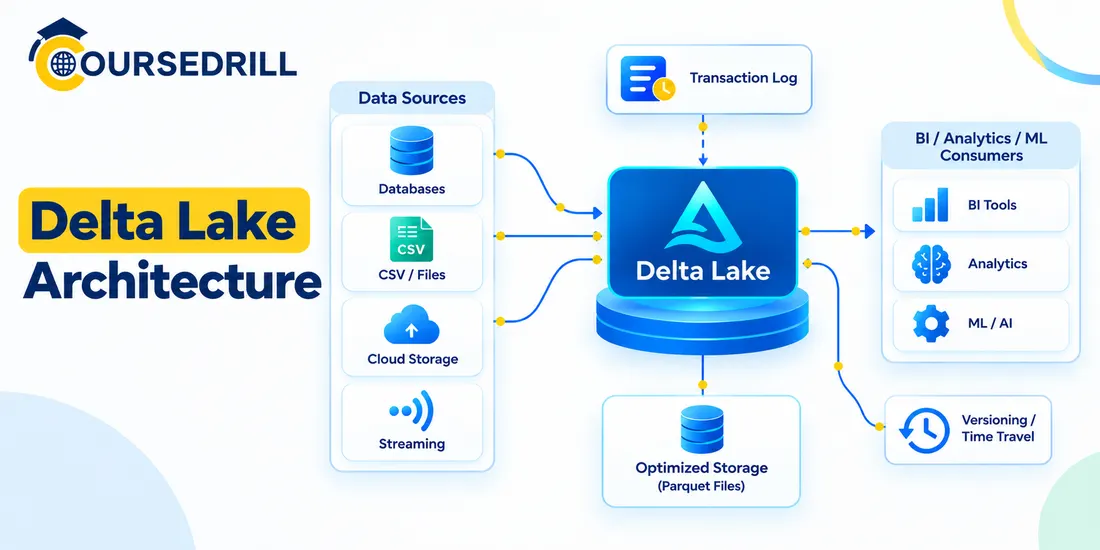
Delta Lake isn’t a new file format. That surprises people the first time they hear it. The data itself still sits in ordinary Apache Parquet files, the same format you’d use without Delta Lake at all. What Delta Lake adds is a layer of metadata called the transaction log, which sits alongside those Parquet files and tracks exactly what belongs in the table at any given moment.
That one addition is what turns a folder of loose files into something that behaves like a real database table. Databricks open-sourced Delta Lake in 2019 and later donated it to the Linux Foundation, and it’s now the default table format across most of the Databricks Lakehouse platform, alongside competing formats like Apache Iceberg and Apache Hudi.
So when people talk about “Delta Lake architecture,” they mean two things working together: the data layer (your Parquet files) and the log layer (the record of what those files mean). Neither one does much on its own. Together, they give you ACID transactions, schema enforcement, time travel, and a lot more, all on storage you already own.
The two layers underneath every Delta table
Strip away all the features and a Delta table is really just a directory. Inside that directory you’ll find two things:
- The data files, stored as standard Parquet, exactly as you’d write them without Delta Lake at all.
- A subfolder named
_delta_log, which holds the JSON and checkpoint files that describe the table’s history.
That’s genuinely it. There’s no proprietary binary format, no special storage engine required, no vendor lock-in on the data itself. If you deleted the _delta_log folder tomorrow, you’d be left with a pile of Parquet files and no way to know which ones are current, which were replaced by an update, or what order they were written in. The log is what makes the difference between “a bunch of files” and “a table.”
This separation matters for a practical reason: it means Delta Lake can sit on any object storage that supports basic read and write operations. S3, ADLS, GCS, or a local filesystem all work the same way, because the intelligence lives in the log, not in the storage layer.
Inside the _delta_log: how the transaction log actually works
Every time something changes a Delta table, whether that’s an insert, an update, a merge, or a schema change, a new JSON file gets written into _delta_log. These files are numbered sequentially, starting from zero:
_delta_log/
  00000000000000000000.json
  00000000000000000001.json
  00000000000000000002.json
  00000000000000000010.checkpoint.parquet
Each JSON file is a list of actions describing what changed in that commit. The main ones you’ll run into are:
add, which registers a new Parquet file as part of the table, along with statistics like min and max values per columnremove, which logically removes a file from the current table version without physically deleting it right awaymetaData, which records the table’s schema, partition columns, and configurationcommitInfo, which logs the operation type, timestamp, and who or what triggered it
Reading a Delta table means replaying these actions in order to figure out which Parquet files are currently valid. That sounds slow if you imagine a table with ten thousand commits, and it would be, which is why Delta Lake periodically writes a checkpoint file, a Parquet snapshot of the entire log state up to that point. Readers can jump to the nearest checkpoint and only replay the JSON commits after it, instead of starting from commit zero every time.
I’ll admit this part isn’t glamorous. Nobody gets excited reading JSON commit logs. But once you’ve spent an afternoon debugging why a table’s row count doesn’t match what you expected, you start to appreciate having an actual paper trail instead of guessing which files are stale.
How Delta Lake pulls off ACID transactions
ACID is the acronym you’ll see attached to Delta Lake in almost every piece of marketing, and it’s worth knowing what each letter is actually buying you.
Atomicity comes from the fact that a commit either writes its full JSON entry to the log or it doesn’t. There’s no in-between state where half a transaction is visible. Consistency comes from schema enforcement, which stops malformed data from ever entering the table in the first place. Isolation is handled through optimistic concurrency control, and durability just means the committed files and log entries persist on the underlying storage the same way any written file would.
The isolation piece is the one worth slowing down on, because it’s what lets multiple people write to the same table at once without corrupting it. Delta Lake doesn’t lock the table while a write happens. Instead, a writer reads the current version of the log, builds its changes, and tries to commit a new log entry at the next version number. If another writer got there first, the commit fails, and Delta Lake checks whether the two sets of changes actually conflict. If they touched different files or different partitions, the second writer’s commit gets retried on top of the new version automatically. If they genuinely collide, one of them fails and has to retry.
This is why you can have a streaming job appending new rows and a batch job running OPTIMIZE on the same table at the same time without either one blowing up the other. It’s not magic, it’s just careful bookkeeping around who touched what.
Schema enforcement and schema evolution
Traditional data lakes have a well-known problem: someone writes a CSV with a typo’d column name, or a new field shows up unannounced, and every downstream job that reads that folder either breaks or silently produces wrong numbers. Delta Lake pushes back on writes that don’t match the table’s registered schema. Try to write a DataFrame with a column the table doesn’t expect, or a type mismatch on an existing column, and the write fails before anything hits storage.
That sounds strict, and it is, on purpose. But schemas do need to change sometimes, so Delta Lake also supports controlled evolution. You can add columns with mergeSchema, or explicitly run ALTER TABLE ADD COLUMNS, and the transaction log records the schema change as a new metaData action, versioned right alongside everything else. Old rows that predate the new column simply return null for it, which is usually what you want.
The distinction to hold onto: schema enforcement stops accidental drift, schema evolution handles intentional changes. Confusing the two is a common source of frustration for teams new to Delta Lake, who either fight the enforcement when they actually wanted evolution, or turn on mergeSchema everywhere and lose the protection entirely.
Time travel: querying yesterday’s version of your table
Because every change is a numbered, logged commit, Delta Lake can reconstruct any past state of a table just by replaying the log up to a given version. This is what people mean by time travel, and it’s one of the more immediately useful features once you’ve needed it once.
SELECT * FROM sales_data VERSION AS OF 42;

SELECT * FROM sales_data TIMESTAMP AS OF '2026-08-15';
You can query by version number or by timestamp, roll a table back to an earlier state, or diff two versions to see exactly what a job changed. It’s genuinely handy for debugging a bad pipeline run, and it doubles as a lightweight audit trail without needing a separate logging system.
There’s a catch worth knowing before you rely on it in production: time travel only works for versions that haven’t been cleaned up by VACUUM. Running VACUUM removes data files that are no longer referenced by the current log, once they’re older than the retention threshold, which defaults to seven days. Run VACUUM aggressively and you’ll lose the ability to travel back further than that window, so if compliance or auditing needs longer retention, that setting needs adjusting deliberately, not left on default.
Data skipping, Z-ordering, and liquid clustering
None of this is useful if queries are still scanning every file in a table just to find a handful of matching rows. Delta Lake handles this at a few different levels.
The first is data skipping, which is basically free. Remember those min and max column statistics stored in each add action in the log? A query with a WHERE filter can check those stats before touching any Parquet file, and skip files whose value range can’t possibly contain a match. No configuration required, this just happens.
The second is Z-ordering, which is something you actively run. OPTIMIZE ... ZORDER BY physically rewrites data files so that rows with similar values in the Z-ordered columns end up colocated in the same files, which makes data skipping far more effective for queries filtering on those columns. The tradeoff is that it’s a manual, batch operation. You have to remember to run it, and on a table that’s constantly getting new data, the clustering quality degrades between runs.
Liquid clustering, introduced with Delta Lake 3.0, is the newer answer to that tradeoff. Instead of clustering as a separate maintenance job, it clusters incrementally as data is written, and you can change which columns it clusters on without rewriting the entire table.
CREATE TABLE orders (
  order_id BIGINT,
  customer_id BIGINT,
  order_date DATE,
  amount DECIMAL(10,2)
) CLUSTER BY (order_date, customer_id);
For new tables, liquid clustering has mostly replaced the old advice of picking partition columns up front and hoping you guessed right. Static partitioning is still around and still useful for very large, coarse-grained splits, but for most tables, liquid clustering is a lot more forgiving if your query patterns shift over time.
Deletion vectors: faster deletes and updates
Before deletion vectors, a DELETE or UPDATE on even a single row meant Delta Lake had to rewrite the entire Parquet file that row lived in, because Parquet files are immutable. On a table with large files, deleting one row could mean rewriting hundreds of megabytes of data you didn’t actually change.
Deletion vectors fix this by marking rows as deleted in a small side file instead of rewriting the whole Parquet file immediately. Readers check the deletion vector and skip those rows, so the table behaves correctly right away, while the actual file compaction gets deferred to a later OPTIMIZE or vacuum pass. For workloads with frequent small deletes or updates, this cuts write amplification substantially, which in practice means faster jobs and lower storage churn.
Change data feed: tracking row-level history
Sometimes you don’t just need the current state of a table, you need to know exactly what changed between two points in time, row by row. That’s what change data feed (CDF) gives you. Once enabled on a table, every insert, update, and delete gets recorded with a _change_type column set to one of insert, update_preimage, update_postimage, or delete, letting downstream consumers process only what actually changed instead of reprocessing the whole table.
This is the feature that makes incremental pipelines genuinely incremental. Feed a Silver table’s changes into a Gold aggregation without a full recompute, or replicate changes into a separate system for auditing, and CDF is usually the mechanism doing the work.
Delta Kernel and Delta UniForm: playing well with Iceberg and Hudi
Two newer pieces of Delta Lake architecture are worth knowing about even if you won’t touch them directly day to day.
Delta Kernel is a simplified, engine-agnostic library that abstracts away the complexity of reading and writing the Delta protocol correctly. Rather than every connector (Spark, Trino, Flink, whatever) reimplementing the full protocol spec from scratch, Delta Kernel gives them a shared, tested foundation, which reduces the chance of subtle protocol bugs across the ecosystem.
Delta UniForm (Universal Format) solves a different problem: the lakehouse world has three competing open table formats, Delta Lake, Apache Iceberg, and Apache Hudi, and most organizations don’t want to pick one and be stuck with it forever.
UniForm generates Iceberg and Hudi-compatible metadata alongside the native Delta log, so the same physical table can be read by tools built for any of the three formats without a separate copy of the data. It’s not a perfect universal translator for every feature, but for read compatibility across the format wars, it’s a meaningful step.
How this architecture shows up in the medallion pattern
You’ll see Delta Lake almost everywhere the medallion architecture is used, and that’s not a coincidence. The pattern organizes data into three layers:
Bronze holds raw data, ingested close to its original form with minimal transformation. Silver holds cleaned, validated, and conformed data, joined and deduplicated into something usable. Gold holds business-level aggregates, ready for dashboards and reporting.
Delta Lake’s features map cleanly onto this. Bronze ingestion benefits from ACID transactions so partial, failed writes never corrupt raw data. Silver transformations lean on schema enforcement and MERGE INTO for reliable upserts.
Gold layers benefit from data skipping and liquid clustering, since that’s where the heaviest read traffic usually lands. Change data feed ties the layers together, letting Silver and Gold tables process only what changed in the layer below instead of recomputing everything on every run.
Delta Lake vs. a plain data lake vs. a data warehouse
| Capability | Plain data lake | Data warehouse | Delta Lake |
|---|---|---|---|
| Storage format | Open (Parquet, CSV, JSON) | Proprietary, vendor-managed | Open (Parquet) |
| ACID transactions | No | Yes | Yes |
| Schema enforcement | No | Yes | Yes |
| Concurrent writes | Risk of corruption | Handled internally | Handled via the transaction log |
| Time travel | No | Sometimes, vendor-dependent | Yes, built in |
| Cost of storage | Low | Higher, tied to compute | Low, same as raw object storage |
| Vendor lock-in | Low | High | Low |
The short version: a plain data lake gives you cheap, open storage but none of the reliability guarantees. A data warehouse gives you those guarantees but usually locks your data into a proprietary format and a specific vendor’s compute. Delta Lake architecture is an attempt to get both, open storage you control, with the transactional guarantees you’d normally have to give up storage independence for.
Practical tips for designing Delta Lake architecture
A few habits separate teams who use Delta Lake smoothly from teams who fight it constantly.
Set a VACUUM retention period deliberately instead of leaving the default, especially if time travel or audit requirements need a longer lookback window than seven days. Prefer liquid clustering over manual Z-ordering for new tables unless you have a specific reason not to, since it removes an entire category of maintenance job you’d otherwise have to schedule and monitor. Turn on change data feed early on tables that feed downstream incremental pipelines, because enabling it after the fact means you lose the change history that happened before you flipped it on.
Keep an eye on small file counts, since a stream that commits too frequently can leave a table with thousands of tiny Parquet files, which hurts read performance even with data skipping in place; regular OPTIMIZE runs (or liquid clustering’s automatic compaction) keep this in check.
A few things that trip people up
Schema enforcement will reject writes that seem like they should obviously work, usually because of a type mismatch that’s easy to miss, like an integer column that suddenly receives a long. It’s not a bug, it’s the enforcement doing its job, but it catches people off guard the first time.
Concurrent writes can still fail if two jobs genuinely modify the same files, and the retry logic isn’t infinite. High-concurrency append-heavy workloads sometimes need architectural changes, like partitioning writers by a natural key, rather than relying on optimistic concurrency to sort everything out indefinitely.
And VACUUM is permanent. Once it removes a file, there’s no undo. Running it with too short a retention window on a table people are actively time-traveling against is a good way to have an uncomfortable conversation with whoever needed that data.
Frequently asked questions
Is Delta Lake a database?
Not exactly. It’s a storage layer that adds database-like guarantees, ACID transactions, schema enforcement, versioning, on top of files sitting in object storage. You still need a compute engine like Spark to actually read and write to it.
Does Delta Lake require Databricks?
No. Delta Lake is open source and works with Apache Spark, Trino, Flink, and other engines outside of Databricks, though Databricks is the platform where it originated and where support is deepest.
What’s the difference between Delta Lake and Apache Iceberg?
Both solve a similar problem, transactional, versioned tables on top of open file formats, but they differ in how their metadata and log structures work. Delta UniForm was built specifically to reduce the friction of choosing between them by making Delta tables readable as Iceberg tables.
How long does time travel go back?
As far back as your VACUUM retention period allows, which defaults to seven days but can be configured longer if your table’s storage costs can absorb keeping older files around.
Do I need to manually run OPTIMIZE if I use liquid clustering?
Less often than with Z-ordering, since liquid clustering handles a lot of the layout work incrementally as data is written. It’s still good practice to monitor file sizes and run maintenance periodically on high-write tables.
Where to go from here
Delta Lake architecture comes down to one core idea done well: keep the data in open Parquet files, and put all the intelligence in a transaction log that tracks exactly what’s true at every point in time. Everything else, ACID transactions, time travel, liquid clustering, deletion vectors, change data feed, is built on top of that one decision.
If this is your first real look at Delta Lake, it’s worth circling back to our What is Delta Lake? Complete Beginner’s Guide for the fundamentals before diving deeper into performance tuning or production design. And if you’d rather practice this hands-on than keep reading about it, that’s exactly what our Databricks and Lakehouse courses are built for.
For the official documentation and protocol specification, the Delta Lake project site and its GitHub repository are the most reliable references as features continue to evolve.
Popular Courses

