
- Posted on
- admin
- No Comments
What Is Delta Lake? Complete Beginner's Guide
Before formats like Delta Lake existed, a “data lake” was really just a folder of Parquet or CSV files in cloud storage, and that folder had none of the guarantees you’d expect from an actual database table. A job that failed halfway through a write could leave the table in a half-written, corrupted state. Two jobs writing at the same time could quietly stomp on each other. There was no way to see what the table looked like yesterday, and adding a column often meant rewriting the entire dataset. Delta Lake exists specifically to close that gap, bringing database-style reliability to data stored as plain files in object storage.
If you’ve read our Apache Iceberg vs Delta Lake comparison or our Apache Hudi tutorial, you already know Delta Lake is one of the three major open table formats powering the modern lakehouse. This guide is the dedicated deep dive: what Delta Lake actually is, how its transaction log works, the features that make it more than “just Parquet with extra steps,” and a hands-on PySpark quickstart so you can see ACID transactions and time travel happen for yourself.
What Is Delta Lake?
Delta Lake is an open-source storage layer that brings ACID transactions, schema enforcement, and time travel to data lakes built on cloud object storage or a distributed file system. (cite index=”30-1″>It was created by Databricks in 2019 and later contributed to the Linux Foundation, built with Apache Spark in mind, with its strongest performance and deepest feature integration remaining within the Spark and Databricks ecosystem.
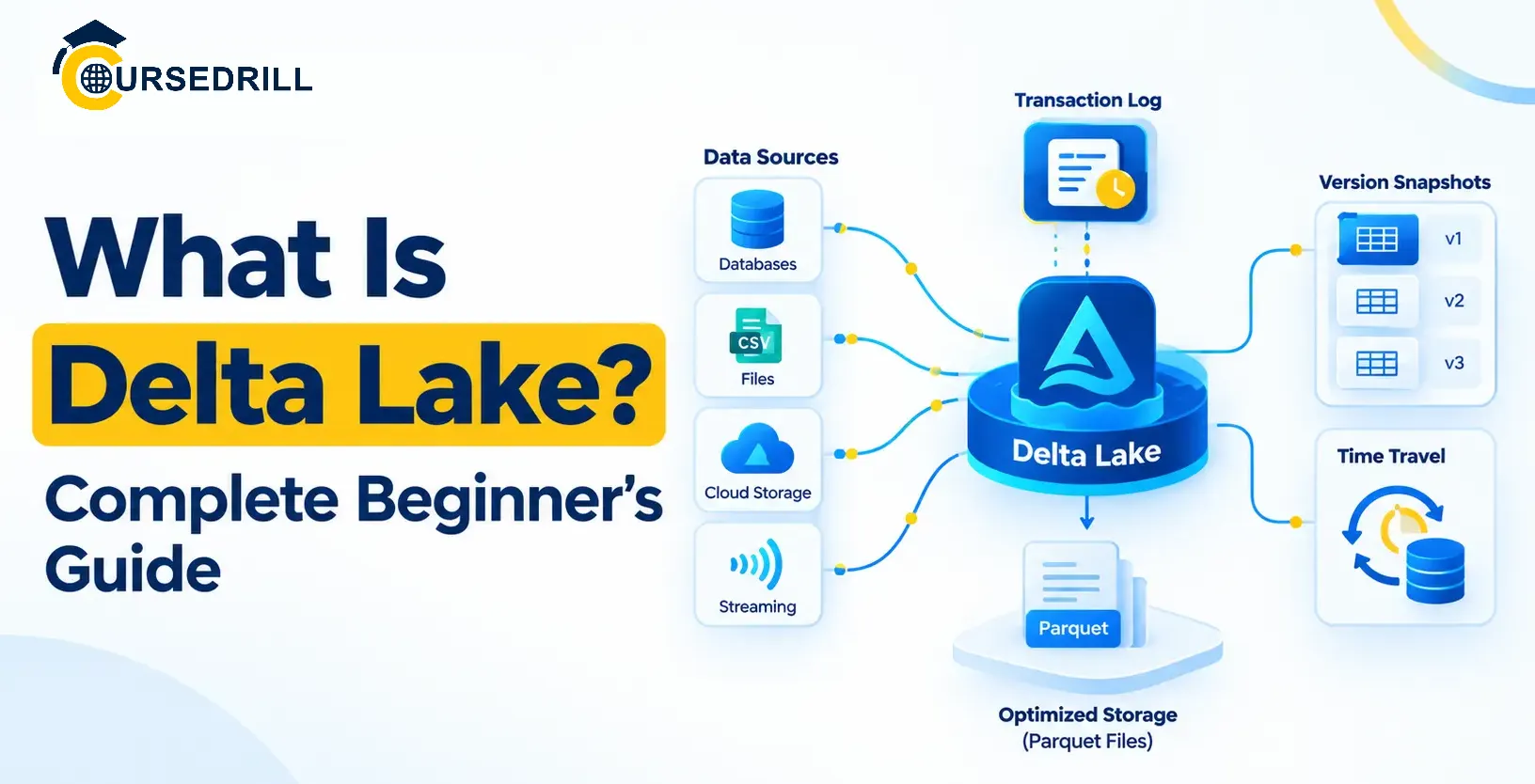
Rather than replacing your existing Parquet files, Delta Lake wraps them with a metadata layer that tracks exactly which files belong to the table, what the current schema looks like, and the full history of every change ever made. (cite index=”29-1″>A Delta table directory contains Parquet data files sitting alongside a _delta_log/ folder, where each JSON commit file records specific actions taken against the table, adding a file, removing a file, or changing table metadata.
Why Delta Lake Exists
It’s worth being concrete about the exact failure modes Delta Lake was built to eliminate, since every architectural decision that follows traces back to one of them.
No atomicity. A Spark job writing thousands of Parquet files could fail after writing half of them, leaving a query engine to read a table that’s silently missing data, with no way to tell the difference between “this table has no more rows” and “this table’s write job crashed.”
No isolation between readers and writers. A query running while a write was in progress could see a half-updated, inconsistent view of the table, some old files, some new ones, with no coherent snapshot to read against.
No schema safety net. Nothing stopped a badly formed write from silently introducing a type mismatch or an unexpected column, corrupting downstream consumers that expected a stable schema.
Expensive schema and partition changes. Adding a column or changing how data was partitioned typically meant rewriting the entire dataset, an operation nobody wanted to run on a multi-terabyte production table.
Delta Lake’s transaction log, covered next, is the single mechanism that solves all four of these at once.
How the Transaction Log Works
(cite index=”35-1″>Delta Lake stores its transaction log as JSON files in a _delta_log/ directory, sequential commit files like 00000.json and 00001.json, with periodic Parquet checkpoint files rolling up older commits so a reader doesn’t need to replay the entire history from the beginning every time.
Every write to a Delta table follows the same pattern: figure out which files need to be added or removed, write a new, sequentially numbered JSON commit file describing exactly that change, and only once that commit file is fully and successfully written does the change become visible to readers. A reader constructing the table’s current state simply reads the most recent checkpoint, then replays any JSON commits written since, arriving at an exact, fully consistent view every time.
That log-replay model is also what makes Delta Lake genuinely self-describing. (cite index=”36-1″>It’s self-describing and doesn’t require an external catalog just to read it, a client can point directly at a Delta table’s storage location and reconstruct its current state from the _delta_log/ directory alone, without needing a separate metastore to first ask “where does this table’s current metadata live.”
Concurrent writers are reconciled through optimistic concurrency control: a writer reads the table’s current state, prepares its change, and attempts to commit the next sequential log entry. If another writer already claimed that slot first, the losing writer’s transaction is retried against the newly updated state rather than silently overwriting anything, which is what keeps two simultaneous writes from corrupting each other.
Core Features
ACID transactions. Every write is atomic and isolated by design, a direct consequence of the commit-log model described above. A reader never sees a partially written state, and a failed job never leaves the table corrupted, since an incomplete commit simply never gets acknowledged as the current version.
Schema enforcement and evolution. Delta Lake validates incoming writes against the table’s declared schema by default, rejecting a write that doesn’t match rather than silently accepting malformed data. When you do want to change the schema deliberately, adding a column, widening a type, Delta supports controlled schema evolution without requiring a full rewrite of existing data.
Time travel. Because every commit is preserved in the log (until explicitly cleaned up), you can query a table exactly as it looked at a previous version or timestamp, using either a version number or a specific point in time, without needing a separate backup or snapshot system.
MERGE for upserts. Delta Lake’s MERGE INTO statement lets you insert, update, and delete rows in a single atomic operation based on a join condition against a source table or DataFrame, the standard way to apply CDC-style changes or deduplicate incoming batches without hand-rolling separate insert and update logic.
Deletion vectors. (cite index=”38-1″>Delta Lake has supported deletion vectors since Databricks Runtime 12.1, letting it mark deleted or updated rows without rewriting the entire Parquet file those rows belong to, dramatically speeding up row-level deletes and updates on large tables compared to rewriting whole files every time.
Change Data Feed. (cite index=”42-1″>Enabling Change Data Feed is as simple as setting the enableChangeDataFeed table property to true, after which downstream consumers can query exactly which rows were inserted, updated, or deleted between any two versions, a straightforward foundation for CDC pipelines and incremental processing.
Liquid clustering. (cite index=”39-1″>Liquid clustering is a data layout optimization technique that replaces traditional table partitioning and Z-ordering, letting you redefine clustering keys at any time without rewriting existing data as analytic needs evolve, removing a lot of the upfront partitioning-strategy guesswork that older lakehouse tables required.
OPTIMIZE and Z-ordering. For tables not yet using liquid clustering, OPTIMIZE compacts small files into larger ones for better read performance, and can be combined with Z-ordering to physically cluster rows by one or more columns so that queries filtering on those columns can skip a much larger share of files during a scan.
VACUUM. Because old file versions stick around to support time travel, storage would grow unbounded without cleanup. VACUUM removes files older than a configured retention window, (cite index=”19-1″>with a default minimum retention period of 168 hours, seven days, and it will never remove files that are still needed to satisfy that retention window for existing time-travel queries.
Delta Kernel and Broader Engine Support
Historically, reading and writing Delta tables outside of Spark meant each engine needed its own hand-built implementation of the protocol, prone to drifting out of sync as the spec evolved. Delta Kernel addresses that directly: a lightweight, purpose-built library that implements the Delta protocol’s reading and writing logic once, so other engines and connectors can embed it rather than re-implementing transaction log parsing, checkpoint handling, and protocol versioning themselves. It’s a meaningful part of why Delta Lake’s engine support has broadened over time beyond its original, deeply Spark-centric roots.
Governance With Unity Catalog
For teams on Databricks specifically, Unity Catalog provides centralized governance across Delta tables, unified permissions, auditing, and data lineage tracking that spans an entire organization’s tables rather than being managed table by table. It’s Databricks’ own governance layer rather than a universal, engine-agnostic catalog standard the way Iceberg’s REST catalog specification aims to be, which is a meaningful consideration if multi-engine portability matters more to your organization than deep, centralized governance within a single platform.
Delta Lake and the Wider Lakehouse Ecosystem
Delta Lake doesn’t exist in isolation from the other two major table formats. (cite index=”40-1″>Databricks introduced UniForm in 2023, which asynchronously generates Iceberg-compatible metadata alongside a table’s native Delta transaction log, letting Iceberg-native query engines read Delta tables without a separate copy or rewrite. Our Iceberg vs Delta Lake comparison covers that interoperability story, along with the deeper architectural contrast between Delta’s linear log and Iceberg’s manifest tree, in far more detail.
Hands-On Quickstart: ACID Transactions and Time Travel With PySpark
The fastest way to internalize what Delta Lake actually buys you is to create a table, break something on purpose, and watch time travel undo it.
Step 1: Install PySpark and Delta Lake
pip install --upgrade pyspark
pip install delta-spark
Step 2: Start a Delta-Enabled Spark Session
(cite index=”20-1″>Configure the SparkSession with the configure_spark_with_delta_pip utility function:
import pyspark
from delta import *

builder = pyspark.sql.SparkSession.builder.appName("DeltaQuickstart") \
    .config("spark.sql.extensions", "io.delta.sql.DeltaSparkSessionExtension") \
    .config("spark.sql.catalog.spark_catalog", "org.apache.spark.sql.delta.catalog.DeltaCatalog")

spark = configure_spark_with_delta_pip(builder).getOrCreate()
Step 3: Create Your First Delta Table
(cite index=”23-1″>To create a Delta table, write a DataFrame out in the delta format:
data = spark.createDataFrame(
    [(1, "alice", 49.99), (2, "bob", 129.50), (3, "carol", 19.99)],
    ["id", "customer", "amount"]
)
data.write.format("delta").save("/tmp/delta-orders")
Look inside /tmp/delta-orders and you’ll find your Parquet data files sitting alongside a _delta_log/ directory containing a single JSON commit, 00000000000000000000.json, describing exactly what that first write added.
Step 4: Update Data and Watch a New Version Appear
from delta.tables import DeltaTable

delta_table = DeltaTable.forPath(spark, "/tmp/delta-orders")
delta_table.update(condition="id = 2", set={"amount": "150.00"})
Check the _delta_log/ directory again, a new JSON commit file now exists, recording this update as its own atomic transaction.
Step 5: Try Time Travel
Query the table exactly as it looked before that update, using the version number:
df_old = spark.read.format("delta").option("versionAsOf", 0).load("/tmp/delta-orders")
df_old.show()
(cite index=”19-1″>You can query using either a version number or a timestamp:
df_at_time = spark.read.format("delta") \
    .option("timestampAsOf", "2026-01-15 10:00:00") \
    .load("/tmp/delta-orders")
Bob’s amount shows as 129.50 in the version-0 query, the value before your update, even though the current table now shows 150.00. Nothing was backed up separately to make that possible, it’s simply reading an earlier, still fully intact log state.
Step 6: Run a MERGE (Upsert)
new_data = spark.createDataFrame(
    [(2, "bob", 200.00), (4, "dave", 75.00)],
    ["id", "customer", "amount"]
)

delta_table.alias("target").merge(
    new_data.alias("source"),
    "target.id = source.id"
).whenMatchedUpdate(set={"amount": "source.amount"}) \
 .whenNotMatchedInsertAll() \
 .execute()
That single MERGE updates Bob’s existing row and inserts Dave as a brand-new row, atomically, in one transaction.
Step 7: Check History and Run Maintenance
delta_table.history().show()(cite index=”26-1″>This displays the provenance information for every write to the table, in reverse chronological order.
Compact small files and clean up old, no-longer-needed versions:
delta_table.optimize().executeCompaction()
delta_table.vacuum(168)  # retain 7 days of history, the default minimum
Common Beginner Mistakes to Avoid
- Running VACUUM with too short a retention window. Setting retention below Delta’s default 168-hour minimum without understanding the tradeoff can silently break time-travel queries and any concurrent long-running readers that still need those older files.
- Ignoring schema enforcement errors instead of fixing the source. A rejected write due to schema mismatch is usually telling you something real changed upstream, treating it as an obstacle to bypass rather than a signal to investigate defeats the entire point of enforcement.
- Skipping OPTIMIZE on frequently updated tables. MERGE and streaming writes both tend to produce many small files over time. Without periodic compaction, query performance degrades gradually and often silently.
- Assuming Delta tables work identically well outside Spark. While Delta Kernel and growing third-party support have broadened engine compatibility significantly, Delta’s deepest feature support and best performance still live within Spark and Databricks specifically.
- Forgetting that DELETE doesn’t reclaim storage immediately. (cite index=”26-1″>Deletion removes data from the latest version of the table but doesn’t remove it from physical storage until old versions are explicitly vacuumed, so a delete alone won’t shrink your storage bill.
Who Should Use Delta Lake?
Delta Lake tends to be the right choice for teams that:
- Are already building on Apache Spark or Databricks, where Delta’s tooling and performance optimizations are most deeply integrated.
- Want a table format that’s self-describing and readable without standing up a separate external catalog first.
- Need built-in, low-friction Change Data Feed support for CDC-style downstream consumers.
- Want liquid clustering’s ability to redefine data layout on the fly as query patterns change, without a disruptive rewrite.
- Are on a platform like Microsoft Fabric that has adopted Delta Lake as its standard table format.
Frequently Asked Questions
Is Delta Lake free and open source? Yes. Delta Lake was created by Databricks and later contributed to the Linux Foundation, and it’s freely available and open source. Its feature roadmap, however, has historically tracked Databricks’ own product priorities more closely than a purely community-governed project would.
Do I need Databricks to use Delta Lake? No. Delta Lake works with open-source Apache Spark directly, and growing support exists across other engines through Delta Kernel and various connectors. That said, the deepest feature support and performance tuning remain most mature specifically within Databricks.
What is the transaction log and why does it matter? The transaction log, stored as sequential JSON files in a table’s _delta_log/ directory, records every change ever made to the table as an atomic commit. It’s what enables ACID transactions, time travel, and a fully auditable history, and it’s also what makes a Delta table self-describing, readable directly without needing a separate external catalog.
How is time travel different from a regular backup? Time travel doesn’t require any separate backup process. Every committed version of a table remains queryable directly from its own transaction log until that version’s files are explicitly removed by VACUUM, so restoring or comparing a previous state is just a query with a version or timestamp option, not a restore operation.
What’s the difference between OPTIMIZE and liquid clustering? OPTIMIZE with Z-ordering requires choosing clustering columns upfront and rewriting data to physically sort by them. Liquid clustering achieves a similar performance goal but lets you change which columns data is clustered by at any time, without needing a full historical rewrite.
Does deleting a row immediately free up storage? No. Deleting a row removes it from the table’s current version, but the underlying file it lived in remains on disk until VACUUM removes old, no-longer-needed versions, since those files might still be required to satisfy time-travel queries against earlier versions.
Can I read a Delta table from Trino or other non-Spark engines? Yes, growing support for reading Delta tables exists across engines like Trino, Presto, and others, particularly aided by Delta Kernel and interoperability features like UniForm, which can expose Delta tables through Iceberg-compatible metadata as well.
Should I choose Delta Lake, Iceberg, or Hudi for a new project? It depends on your priorities more than raw feature capability at this point, since all three now handle ACID transactions, schema evolution, and time travel competently. Delta Lake is the strongest fit if you’re deeply invested in Spark or Databricks specifically; our comparison and tutorial pieces on Iceberg and Hudi cover when those alternatives make more sense.
Final Thoughts
Delta Lake’s core idea is straightforward once the transaction log clicks: every change to the table is an atomic, ordered, permanently recorded commit, and everything else, ACID guarantees, time travel, schema enforcement, MERGE-based upserts, is a direct consequence of that one design decision. Running the quickstart above, watching a versionAsOf query pull back data exactly as it looked before an update, is worth more than reading about the transaction log in the abstract, it’s the moment the whole architecture stops being a diagram and starts being something you’ve actually seen work.
For the authoritative, continuously updated reference on every feature and configuration option covered here, Delta Lake’s official documentation is the best place to go deeper, and our Iceberg vs Delta Lake comparison is worth reading next if you’re actively deciding between the two for a new project.
For more breakdowns of open-source data infrastructure and DevOps tooling like this one, keep exploring the guides on CourseDrill.
Popular Courses

