
- Posted on
- admin
- No Comments
What is Keycloak and How Does It Work?
What is Keycloak? Learn how this open-source identity and access management tool handles SSO, OAuth2, and OIDC, and how it actually works.
If your team has ever debated whether to build yet another login system from scratch, or bolt on single sign-on to five different internal tools separately, Keycloak is one of the first names that comes up. So what is Keycloak, and how does it actually work under the hood? This guide covers the core concepts, the architecture, and a working example, so you can evaluate whether it fits your own setup.
What is Keycloak?
Keycloak is an open-source identity and access management (IAM) platform that handles authentication and authorization for applications and services, so individual teams don’t need to build and maintain their own login systems, password storage, or session management from scratch. It implements industry-standard protocols, OAuth 2.0, OpenID Connect (OIDC), and SAML, giving you a centralized identity provider that any compatible application can integrate with, rather than every app in your organization reinventing authentication independently.
Keycloak originated as a project from Red Hat (building on earlier work from the JBoss community) and has since become one of the most widely adopted open-source IAM solutions available. In 2023, Keycloak was donated to the Cloud Native Computing Foundation (CNCF) as an incubating project, joining the same foundation that hosts Kubernetes, OpenTelemetry, and Backstage, reflecting its growing role as core infrastructure in modern cloud-native stacks.
At its core, Keycloak solves a problem every growing engineering organization eventually runs into: authentication and authorization are deceptively hard to get right, and building them yourself for every application means repeatedly solving the same hard problems (secure password storage, session handling, multi-factor authentication, protocol compliance) instead of focusing on what actually makes your application valuable.
The Problem Keycloak Solves
To understand why Keycloak (or a tool like it) matters, it helps to look at what happens without centralized identity management.
In an organization with a handful of internal tools, a wiki, a dashboard, an admin panel, each one often ends up with its own separate login system. Users need separate accounts and passwords for each, admins need to manage user provisioning and deprovisioning separately across every system, and every individual application is independently responsible for getting security-critical authentication code right, storing passwords securely, handling session expiration correctly, resisting common attack patterns.
This doesn’t scale well, and it’s genuinely risky. Every additional application implementing its own authentication is another surface area where a security mistake can happen. When an employee leaves the company, deprovisioning access means remembering to individually disable their account across every single system they had access to, an error-prone, manual process that regularly leaves stale access lingering longer than it should.
Keycloak’s answer is centralization. Applications delegate authentication to Keycloak instead of implementing it themselves, users log in once and get access to every connected application (single sign-on), and administrators manage users, roles, and permissions in one central place rather than across a scattered collection of independent systems.
How Keycloak Works: Core Architecture
Keycloak’s architecture is organized around a handful of core concepts, and understanding them is the fastest way to understand how the whole system fits together.
Realms
A realm is Keycloak’s top-level isolation boundary, a completely separate space of users, credentials, roles, and configured applications. Organizations typically use realms to separate distinct populations, an internal-employees realm, a customer-facing realm, or separate realms per business unit or environment (staging versus production). Users, roles, and configuration in one realm are entirely isolated from another, even within the same Keycloak instance.
Clients
A client represents an application that wants to use Keycloak for authentication, your internal dashboard, a mobile app, an API backend. Each client is registered within a realm and configured with the specific protocol it uses (OIDC or SAML), what URLs it’s allowed to redirect users back to after login, and what type of client it is (a confidential client that can securely store a secret, like a backend service, versus a public client that can’t, like a single-page application running entirely in a browser).
Users, Roles, and Groups
Users are the actual identities Keycloak manages, along with their credentials and profile information. Roles define permissions, either realm-level roles applying across all clients in a realm, or client-specific roles scoped to a single application. Groups let you organize users and assign roles collectively, rather than managing permissions for every individual user one at a time.
Identity Providers and Federation
Rather than only managing credentials directly, Keycloak can federate identity from external sources. It supports connecting to existing LDAP or Active Directory servers, letting organizations keep their existing corporate directory as the source of truth while Keycloak handles the modern authentication protocols on top of it. It also supports social and external identity providers, letting users log in through Google, GitHub, or another organization’s Keycloak instance, brokering that external login into a session with your own applications.
The Admin Console
Keycloak ships with a web-based admin console for managing realms, clients, users, roles, and nearly every other piece of configuration without needing to edit files or restart the server. This is typically where day-to-day identity administration actually happens, provisioning new users, adjusting role assignments, configuring a new client application, once the initial setup is in place.
Themes
Keycloak’s login, registration, and account management pages are fully themeable, letting organizations replace the default UI with branded pages matching their own product’s look and feel, so the authentication experience doesn’t feel like a jarring redirect to an obviously separate, unbranded system.
Key Protocols: OAuth2, OIDC, and SAML
Keycloak’s real power comes from implementing these protocols correctly and consistently, so your applications don’t need to.
OAuth 2.0 is an authorization framework, defining how an application can obtain limited access to a user’s resources without handling their credentials directly. It’s the underlying framework OIDC is built on top of.
OpenID Connect (OIDC) adds an authentication layer on top of OAuth 2.0, specifically defining how to verify a user’s identity and obtain basic profile information, not just authorize access to a resource. Most modern web and mobile applications integrating with Keycloak use OIDC.
SAML (Security Assertion Markup Language) is an older, XML-based protocol for exchanging authentication and authorization data, still common in enterprise environments, particularly for integrating with legacy enterprise software that predates OIDC’s widespread adoption.
Keycloak supports all three, which matters in practice because real organizations often have a mix of modern applications that speak OIDC and older enterprise tools that only support SAML. Rather than needing separate identity solutions for each, Keycloak can serve as a single identity provider speaking whichever protocol each individual application requires.
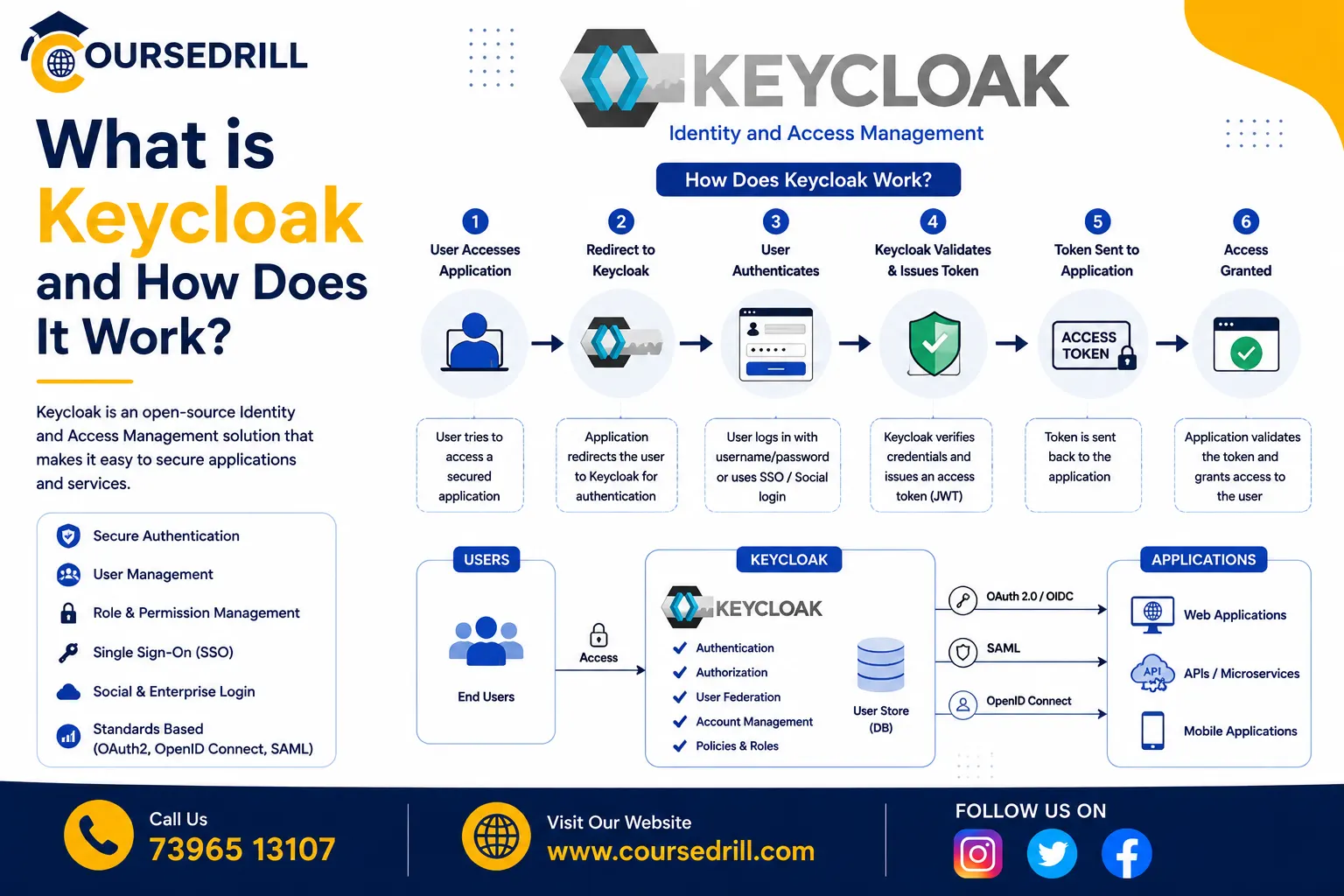
How Authentication Actually Flows
Here’s what happens, step by step, in a typical OIDC login flow using Keycloak, known as the Authorization Code flow, the most common and secure pattern for web applications.
- A user tries to access a protected application, and the application redirects them to Keycloak’s login page instead of showing its own login form.
- The user authenticates directly with Keycloak, entering their password, completing multi-factor authentication if configured, or logging in through a federated identity provider.
- Keycloak redirects the user back to the application with a short-lived authorization code attached to the redirect URL.
- The application’s backend exchanges that authorization code, along with its own client credentials, directly with Keycloak’s token endpoint, a server-to-server call, not visible to the user’s browser.
- Keycloak validates the exchange and returns an access token, an ID token, and typically a refresh token.
- The application uses the access token to make authenticated requests to protected APIs, and the ID token to know who the user actually is, their username, email, and any other configured profile claims.
- When the access token eventually expires, the application uses the refresh token to obtain a new one without requiring the user to log in again, keeping the session active seamlessly in the background.
The user never enters their password directly into the application itself, only into Keycloak’s own login page. This is a deliberate security property: individual applications never need to see or handle raw credentials at all, meaningfully reducing the number of places a password could be compromised.
A Simple Example: Running Keycloak Locally
The fastest way to try Keycloak is through its official Docker image:
docker run -p 8080:8080 \
  -e KEYCLOAK_ADMIN=admin \
  -e KEYCLOAK_ADMIN_PASSWORD=admin \
  quay.io/keycloak/keycloak:latest start-dev
This starts a local Keycloak instance in development mode, accessible at http://localhost:8080, with an admin account you can use to log into the admin console immediately.
From the admin console, creating a working setup for a test application takes a few steps: create a new realm (or use the default master realm for quick testing), create a client under that realm with your application’s redirect URL configured, and create a test user with a password. Once that’s done, your test application can redirect users to Keycloak’s login page for that realm and client, following the Authorization Code flow described above, without writing any authentication logic of your own beyond handling the redirect and the token exchange.
Keycloak vs Alternatives
Keycloak isn’t the only identity management option, and it’s worth understanding where it fits relative to the alternatives.
Keycloak vs Auth0 or Okta. Auth0 and Okta are commercial, hosted identity-as-a-service platforms, offering managed infrastructure, extensive integrations, and dedicated support, at an ongoing subscription cost that typically scales with the number of active users. Keycloak is self-hosted and free, giving you full control and no per-user licensing cost, at the expense of needing to run and maintain the infrastructure yourself.
Keycloak vs AWS Cognito. Cognito is AWS’s managed identity service, tightly integrated with the rest of the AWS ecosystem. It’s a reasonable choice for teams already deeply invested in AWS, but Keycloak’s protocol-standard approach makes it more portable across cloud providers and easier to migrate away from if your infrastructure choices change later.
Keycloak vs building custom authentication. Rolling your own authentication gives maximum control but means repeatedly solving hard, security-critical problems (password hashing, session management, protocol compliance, multi-factor authentication) that a mature, widely audited open-source project has already solved correctly. For nearly every use case beyond a very simple, single application, adopting an existing IAM solution is the safer and faster path.
Common Use Cases for Keycloak
Keycloak shows up across a wide range of identity and access scenarios:
- Single sign-on across internal tools, letting employees log in once and access every connected internal application without re-authenticating
- Centralized authentication for customer-facing applications, handling registration, login, password resets, and multi-factor authentication for a product’s end users
- API security, issuing and validating access tokens that protect backend services and microservices from unauthorized access
- Legacy system integration, bridging modern OIDC-based applications with older SAML-based enterprise software through a single identity provider
- Identity federation, connecting to an existing corporate LDAP or Active Directory so Keycloak becomes the modern authentication layer without requiring a separate, duplicate user directory
- Authentication for developer platforms, including tools like Backstage, which supports Keycloak as one of its configurable authentication providers, letting engineering teams tie developer portal access into the same identity system used across the rest of the organization; see our What is Backstage in DevOps guide for more on that specific integration point
Deployment Options
Keycloak is self-hosted by design, and organizations typically run it in one of a few common configurations.
Docker or Docker Compose, suitable for local development and small-scale deployments, similar to the quick start example above.
Kubernetes, often using the official Keycloak Operator, which manages Keycloak deployments, database connections, and configuration as Kubernetes-native resources, a common choice for organizations already running cloud-native infrastructure.
Traditional server deployment, running Keycloak directly on virtual machines or bare metal, still supported and used by organizations with existing infrastructure conventions outside of containers.
Regardless of deployment method, Keycloak requires a backing database (PostgreSQL is a common production choice) to persist realms, users, and configuration, separate from the Keycloak server process itself.
Benefits of Using Keycloak
Pulling together what makes Keycloak worth adopting:
No per-user licensing cost. As a free, open-source project, Keycloak avoids the recurring subscription costs commercial identity-as-a-service platforms charge as your user base grows.
Full protocol coverage. Native support for OAuth 2.0, OIDC, and SAML means Keycloak can serve as a single identity provider across a genuinely mixed environment of modern and legacy applications.
Complete control over your data and infrastructure. Since Keycloak is self-hosted, user data and credentials never need to leave your own infrastructure, a meaningful consideration for organizations with strict data residency or compliance requirements.
Mature and widely adopted. As a long-standing project now under CNCF governance, Keycloak has been extensively used and security-audited across a large number of production deployments, reducing the risk of relying on it for security-critical infrastructure.
Deep customization. Themes, custom authentication flows, and a rich extension system let organizations adapt Keycloak’s behavior and appearance well beyond its out-of-the-box defaults.
Challenges and Things to Consider
Keycloak isn’t without real operational tradeoffs.
Self-hosting means your team is responsible for running, scaling, patching, and securing Keycloak itself, a genuine operational commitment compared to a managed identity-as-a-service platform where that infrastructure burden belongs to the vendor instead.
The admin console and configuration surface is extensive, which is powerful but also means a real learning curve for administrators setting up realms, clients, and authentication flows correctly for the first time, particularly around getting security-sensitive settings right.
High-availability, production-grade Keycloak deployments require real infrastructure investment, a properly configured, resilient database backend, and often a clustered Keycloak deployment for redundancy, which is a more involved setup than a single Docker container running in development mode.
Frequently Asked Questions About Keycloak
Is Keycloak free to use? Yes. Keycloak is fully open source and free, with no per-user or per-application licensing cost. Cost comes from the infrastructure and engineering time required to run and maintain your own instance.
Do I need to be a security expert to use Keycloak safely? Not to get started, but production deployments handling real user credentials deserve careful configuration, particularly around token lifetimes, client security settings, and multi-factor authentication policy. Keycloak’s defaults are reasonable, but security-critical infrastructure always benefits from careful review before going live.
Can Keycloak replace my company’s existing Active Directory? Not necessarily replace, but Keycloak commonly integrates with an existing Active Directory or LDAP server as a federated identity source, letting you keep your existing directory as the source of truth while gaining modern protocol support (OIDC, SAML) on top of it.
Does Keycloak support multi-factor authentication? Yes, including built-in support for one-time password (OTP) applications, and extensibility for additional authentication factors through Keycloak’s authentication flow customization.
Is Keycloak suitable for a small team or a single application? It can be, though the operational overhead of self-hosting may not be worth it for a very small project with simple needs. Keycloak’s value grows with the number of applications and users you need to manage centrally; a single small application might be better served by a simpler, lighter-weight authentication library initially.
How does Keycloak compare in terms of maturity to commercial alternatives? Keycloak has a long production track record and, since joining the CNCF, continues to see active development and community investment. It’s used in production by a wide range of organizations, from small teams to large enterprises, and is generally considered a mature, battle-tested option in the identity management space.
Wrapping Up
So, what is Keycloak, and how does it work, in a nutshell? It’s an open-source identity and access management platform that centralizes authentication and authorization across your applications, speaking the industry-standard OAuth 2.0, OIDC, and SAML protocols, so individual teams stop reinventing login systems and users get a single, unified sign-on experience across everything they need to access.
For organizations weighing centralized identity management, Keycloak offers a mature, protocol-complete, and genuinely free alternative to commercial identity-as-a-service platforms, at the cost of taking on the operational responsibility of running it yourself. Whether that tradeoff makes sense depends heavily on your team’s infrastructure capacity and how much control over your own identity data actually matters for your specific situation.
For deeper technical reference as you evaluate or start building, the official Keycloak documentation covers realm configuration, authentication flows, and production deployment guides in far more depth than a single overview article can.
Popular Courses

